Athletic Archive Metadata Standards for Searchable School History
- Home /
- Touch Archive Blog /
- Athletic Archive Metadata Standards for Searchable School History

The Easiest Touchscreen Solution




Live Example: Rocket Alumni Solutions Touchscreen Display
Interact with a live example (16:9 scaled 1920x1080 display). All content is automatically responsive to all screen sizes and orientations.
Athletic archive metadata standards are the agreed-upon field names, value formats, and controlled vocabularies that allow a school’s historical records — athlete names, seasons, sports, awards, and statistics — to be searched, sorted, filtered, and displayed consistently regardless of who entered the data or which system holds it. Without standards, a database of ten thousand records becomes an unsearchable list: “Basketball” in one entry, “Boys Basketball” in another, “BB-Varsity” in a third, and “M. Johnson” in the athlete field where one staff member typed “Marcus Johnson” and another typed “Johnson, M.”
This guide defines the core fields every athletic archive metadata schema needs, provides ready-to-use reference tables, walks through the most common standardization decisions — names, dates, sport names, award types — and explains how a consistent metadata schema directly enables the searchable digital displays, touchscreen records, and recognition programs that make decades of school history visible to current students, visitors, and alumni.
When a hall-of-fame committee searches for every athlete from the women’s basketball program inducted between 1995 and 2010, one of two things happens: either the records surface in seconds, or a staff member spends a half-day manually reading rows in a spreadsheet. The difference between those outcomes is metadata standards — not better software, not more staff, but consistent field values that a search query can actually match.

Athletic record displays in school hallways draw from metadata-rich archive databases — consistent field names and values are what make decades of history searchable for every recognition program that follows
What Athletic Archive Metadata Standards Are and Why They Matter
A metadata standard is a documented decision about how a piece of information will be recorded. It answers questions like:
- Will a sport be listed as “Football” or “FTBL” or “Boys Varsity Football”?
- Will a season be stored as “2024” or “2024-25” or “Fall 2024”?
- Will an athlete’s name be stored as “First Last,” “Last, First,” or in separate First and Last fields?
- Will an award be recorded as “All-State” or “All State” or “All-State First Team” or “1st Team All-State”?
These are not trivial questions. Every inconsistency in the values stored under these fields creates a category of records that will not surface in a search, will not match when a display platform tries to filter by sport or season, and will require manual correction at the worst possible moment — when a hall-of-fame nomination is being processed or a touchscreen display is being populated.
For programs evaluating the best hall of fame tools for athletics and donor recognition, arriving with a metadata standard already in place is one of the strongest positions a school can be in — it means the archive’s data can be imported accurately, and the display platform’s search and filter features work correctly from day one.
The Core Metadata Schema: Fields Every Athletic Record Needs
The following schema covers the minimum fields that a searchable athletic archive record requires. It is organized into four categories: identity fields, classification fields, achievement fields, and administrative fields.
Core Athletic Archive Metadata Schema
| Field Name | Description | Format / Controlled Vocabulary | Required? |
|---|---|---|---|
| AthleteID | Unique identifier for the individual | Alphanumeric code (e.g., OAK-0001) | Yes |
| LastName | Athlete’s family name | Text; last name only | Yes |
| FirstName | Athlete’s given name | Text; first name only | Yes |
| GraduationYear | Year the athlete graduated | 4-digit year (e.g., 1998) | Yes |
| Sport | Sport name from controlled vocabulary | See sport vocabulary list below | Yes |
| Level | Competitive level | Varsity / JV / Freshman / Club | Yes |
| Season | Academic year of participation | YYYY-YY format (e.g., 1997-98) | Yes |
| AwardType | Type of recognition received | See award vocabulary list below | Conditional |
| AwardYear | Year the award was earned | 4-digit year | Conditional |
| AwardTitle | Full award name | Text; use official award name | Conditional |
| RecordType | Category of a statistical record | See record vocabulary list below | Conditional |
| RecordValue | Numeric or text value of the record | Numeric with unit (e.g., 48.32 sec) | Conditional |
| RecordDate | Date the record was set | ISO 8601 date (YYYY-MM-DD) | Conditional |
| EvidenceFileRef | Reference to supporting documentation | File name (matches archive convention) | Recommended |
| PortraitFileRef | Reference to athlete portrait image | File name (matches archive convention) | Recommended |
| DisplayStatus | Whether record is approved for display | Active / Pending / Archived | Yes |
| EntryDate | Date this record was entered | ISO 8601 date (YYYY-MM-DD) | Yes |
| EnteredBy | Staff member who created the record | Name or staff ID | Yes |
| Notes | Non-structured supplementary information | Text; brief and factual | Optional |
“Conditional” fields are required when the record type calls for them — an award record needs AwardType and AwardYear; a statistical record needs RecordType and RecordValue. All identity fields and administrative fields apply to every record.
This schema is designed to be implemented in a spreadsheet for programs starting from scratch, or used as a mapping reference when importing data into a digital recognition platform. The field names here are labels, not database column names — your platform or spreadsheet may use different column headers as long as the fields map correctly.

Touchscreen recognition systems display metadata fields as visible content — portrait, name, graduation year, sport, and achievement each correspond to a specific field in the archive schema that must be populated consistently to display correctly
Controlled Vocabularies: The Decision Your Archive Needs to Make Once
Controlled vocabularies are the predefined, approved list of values for a given field. If the Sport field accepts any free-text entry, it will accumulate inconsistencies over years of data entry by multiple staff members. If it accepts only values from an approved list, every record for the same sport is identical — and every search, filter, and automated display works correctly.
The following vocabularies represent recommended starting points. Schools should adopt and document these lists before entering data, and should update the lists only through a deliberate decision process — never by allowing ad-hoc additions in the field.
Sport Vocabulary (Recommended Standard Values)
| Display Name | Internal Code | Notes |
|---|---|---|
| Baseball | BASE | |
| Basketball — Boys | BBALL-B | Distinguish gender when both programs exist |
| Basketball — Girls | BBALL-G | |
| Cross Country — Boys | XC-B | |
| Cross Country — Girls | XC-G | |
| Field Hockey | FHKY | |
| Football | FTBL | |
| Golf — Boys | GOLF-B | |
| Golf — Girls | GOLF-G | |
| Ice Hockey | IHKY | |
| Lacrosse — Boys | LAX-B | |
| Lacrosse — Girls | LAX-G | |
| Soccer — Boys | SOCC-B | |
| Soccer — Girls | SOCC-G | |
| Softball | SFTBL | |
| Swimming — Boys | SWIM-B | |
| Swimming — Girls | SWIM-G | |
| Tennis — Boys | TENS-B | |
| Tennis — Girls | TENS-G | |
| Track & Field — Boys | TRACK-B | |
| Track & Field — Girls | TRACK-G | |
| Volleyball — Boys | VOL-B | |
| Volleyball — Girls | VOL-G | |
| Wrestling | WRSTL | |
| Multi-Sport / All-Athletics | ATHL | For all-sports events, banquets, and all-sport awards |
Use the Display Name in any interface or document visible to users and coaches. Use the Internal Code in database fields and file names to ensure exact matches across systems. Both values should appear in the controlled vocabulary reference document maintained in the archive’s _Admin folder.
Award Type Vocabulary
| Award Category | Controlled Value | Examples |
|---|---|---|
| Post-season team honor | All-Conference | All-Metro Conference, All-League |
| Post-season team honor | All-State | 1st Team All-State, Honorable Mention All-State |
| Post-season team honor | All-Region | NFHS Region 4 All-Region |
| Post-season individual | Player of the Year | Conference POY, Section POY |
| Post-season individual | MVP | Team MVP, Tournament MVP |
| Post-season individual | Scholar-Athlete | State Scholar-Athlete Award |
| Hall of Fame | Hall of Fame Inductee | Athletic Hall of Fame, Coaches Hall of Fame |
| Championship | Team Championship | State Championship, Conference Title, Sectional Title |
| Record | Program Record | School Record, State Record, Conference Record |
| Season honor | Captain | Team Captain |
| Coaching | Coach of the Year | Conference Coach of the Year |
For schools with a multi-sport academic achievement recognition program, adding an Academic award category — Scholar-Athlete, Academic All-State, Honor Roll — and following the same controlled vocabulary discipline for those fields ensures that the same search and filter logic works across athletic and academic recognition records in a unified archive.
Level Vocabulary
Record the competitive level at which an achievement was earned. A state championship earned by a varsity program and a conference title earned by a JV program are meaningfully different records and should be distinguishable by field value.
| Level | Notes |
|---|---|
| Varsity | Default for most athletic archive records |
| Junior Varsity | JV competitive programs; specify when relevant to the award |
| Freshman | Freshman programs |
| Club | School-sponsored club sports |
| All-Levels | Use for awards or records that span multiple levels |
Standardizing Names, Dates, and Seasons
Athlete Names
Store names in separate FirstName and LastName fields. Do not use a combined “Full Name” field as the primary storage format — a combined field is convenient to display but inflexible to sort, search, and match. A record that stores “Johnson, Marcus” in a single field will not match a platform that expects separate fields, and a display that wants to show “Marcus Johnson” cannot reliably reconstruct it from a “Johnson, M.” format.
Name standardization rules:
- Enter legal name as it appears on official school records
- Use a separate Preferred Name field if display preferences differ from legal name
- Store suffixes (Jr., III) in a separate Suffix field; do not append them to LastName
- For married or changed names, store the name used during participation; use a separate AlternateName field for updates
- Never use all-caps or all-lowercase; use standard title-case capitalization
Dates and Seasons
Inconsistent date and season formats are the most common source of search failure in athletic archives. A record stored as “2024-25,” another as “2024,” and another as “2024-2025” for the same basketball season will not all surface in a filter for that season.
Date field rules:
- RecordDate, EntryDate: Use ISO 8601 format — YYYY-MM-DD (e.g., 1998-03-14). This format sorts correctly as text and is unambiguous across regional date-format conventions.
- GraduationYear: 4-digit year only (e.g., 1998). Do not append “Class of” or abbreviated two-digit shorthands.
- Season: YYYY-YY format for two-year academic seasons (e.g., 1997-98, 2024-25). For single-year seasonal sports, use 4-digit year only (e.g., 2024).
- AwardYear: 4-digit year representing the year the award was given, not the academic season it covered.
Season vs. year: When a sport spans an academic year (basketball runs October 2024 through March 2025), use the YYYY-YY format — “2024-25.” When a sport is entirely within one calendar year (spring track, fall football), use the 4-digit year — “2024.” Document and apply this rule consistently across all sports; inconsistency between “2024” and “2024-25” for sports in the same archive creates exactly the kind of mismatches that defeat search.
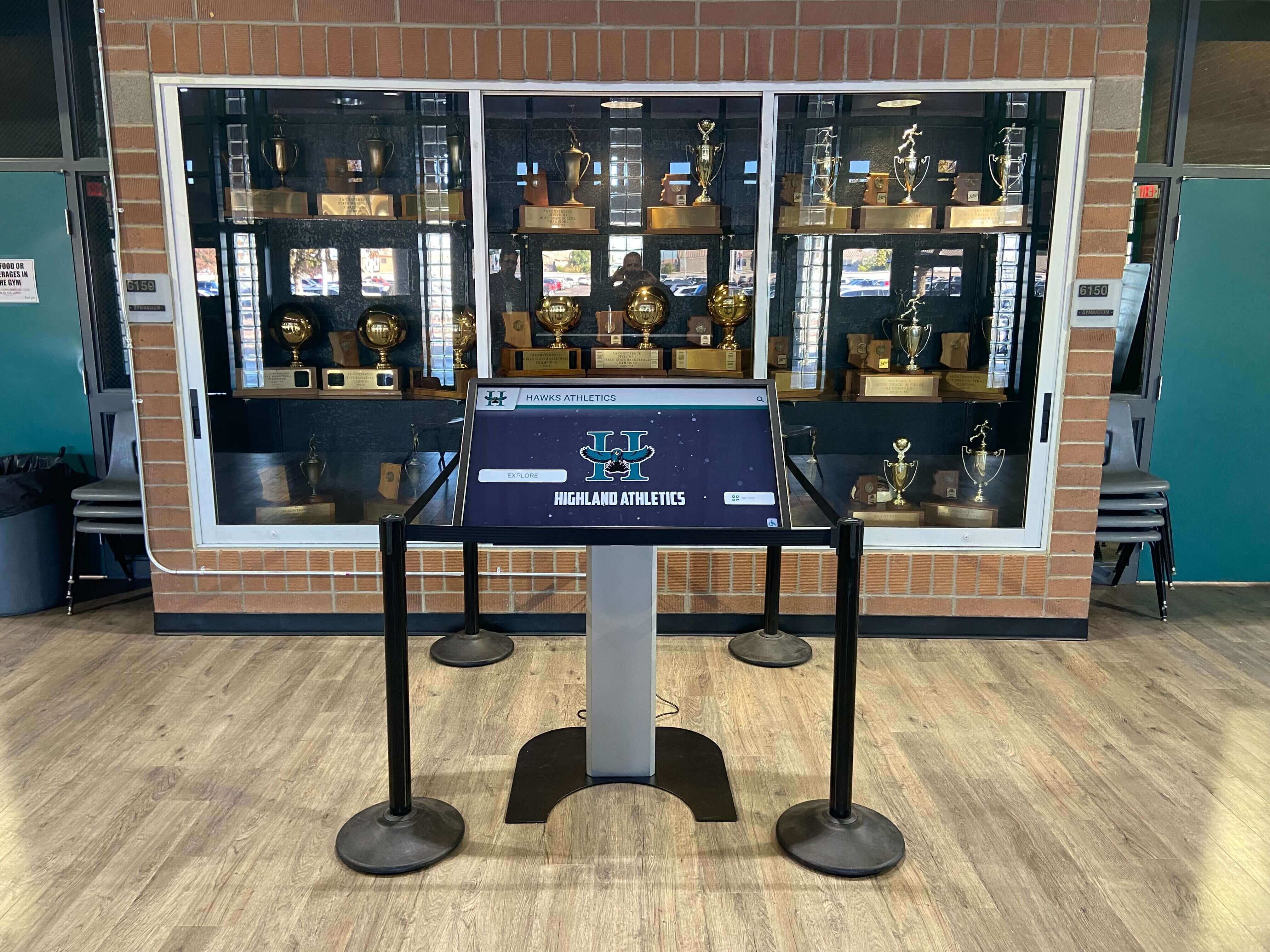
Trophy case displays with integrated digital record boards surface data from archive metadata — consistent date formats, sport names, and award values are what make every displayed record accurately searchable and sortable
Step-by-Step: Implementing Metadata Standards for an Athletic Archive
Step 1: Document your controlled vocabularies before entering any data
Before a single record is created, document the approved sport names, award types, level values, date formats, and name-entry rules in a reference document. Save this document in the _Admin folder of the archive where every contributor can access it. A one-page PDF that answers “what do I type in this field?” prevents years of inconsistent data entry.
Step 2: Audit existing records for field consistency
If the archive has existing data — in a spreadsheet, a database, or a previous recognition platform — run a frequency analysis on key fields. Sort the Sport column and count distinct values; if you find twenty-three variations of “Basketball,” those are the inconsistencies to fix before the archive is searchable. Prioritize the fields used in search and display: Sport, Season, GraduationYear, AwardType, and DisplayStatus.
Step 3: Assign a unique AthleteID to every individual
A unique identifier is the technical foundation of a searchable archive. An athlete who participated in three sports across four seasons should have one AthleteID that links all of their records — not three separate entries that happen to share a name. Common approaches include a school-prefix plus sequential number (OAK-0001) or graduation year plus sequential number (1998-001). Choose a format, document it, and never reuse IDs.
Step 4: Create a data entry template for each record type
A data entry template — a formatted spreadsheet row or intake form — prevents field-level errors by constraining entry to the approved vocabulary. For each record type (athlete biographical record, award record, statistical record, team season record), create a template that includes every required and conditional field with dropdown lists or validation rules for controlled vocabulary fields. Staff entering data should never type free-text into a field that has a controlled vocabulary.
Step 5: Establish a review workflow for new entries
New archive entries should go through a brief review step before the DisplayStatus is set to “Active.” The review confirms that controlled vocabulary values are correct, that required fields are populated, and that supporting evidence files (EvidenceFileRef, PortraitFileRef) are correctly named and stored in the archive. A two-step entry-review workflow prevents errors from reaching the public-facing display.
Step 6: Document and communicate every schema change
When a new sport is added to the program and its internal code must be added to the sport vocabulary, that change must be documented in the _Admin reference file and communicated to everyone who enters archive data. Undocumented vocabulary additions are the most common cause of vocabulary drift in multi-contributor archives. Treat schema changes as decisions, not informal updates.
For programs exploring interactive digital hall of fame tools for athletics, donors, and school history, a documented metadata standard is what enables accurate platform onboarding — the cleaner and more consistent the archive data, the faster and more accurately records can be imported and displayed.
See How Standardized Athletic Archive Metadata Powers a Searchable Recognition Display
When your archive follows consistent field names, controlled vocabularies, and date formats, every record — athlete portraits, award histories, team championships, statistical records — is immediately searchable and ready to surface on an interactive touchscreen display. Rocket Alumni Solutions transforms well-organized athletic archives into living recognition experiences that engage students, alumni, and visitors every day.
Request a DemoMetadata for Team Records vs. Individual Records
Athletic archives typically hold two categories of records that require different metadata structures: individual records (tied to a specific athlete) and team records (tied to a season or program). A metadata schema that conflates these two categories creates confusion — team championships attached to an individual athlete’s record look like personal awards; individual honors attached to a team season record become unsearchable by athlete name.
Team Season Record Fields
| Field | Description | Format |
|---|---|---|
| TeamID | Unique identifier for the team | OAK-FTBL-2024 |
| Sport | Sport name from controlled vocabulary | See sport vocabulary |
| Season | Academic year | YYYY-YY or YYYY |
| Level | Competitive level | Varsity / JV |
| HeadCoach | Head coach name | Last, First |
| WinLossRecord | Season win-loss-tie record | W-L or W-L-T |
| ConferenceFinish | Final conference standing | Text (e.g., “1st, Central Conference”) |
| PostseasonResult | Final postseason result | Text (e.g., “State Champion,” “Sectional Finalist”) |
| RosterFileRef | Reference to final season roster file | File name |
| TeamPhotoRef | Reference to team portrait file | File name |
| DisplayStatus | Approval for display | Active / Pending / Archived |
For team championship records — state titles, conference championships, sectional appearances — the PostseasonResult field carries the primary achievement value. Programs that use a digital record board to display championship history and seasonal records rely on this field being populated consistently to display and sort championship records accurately.
Individual Award Record Fields
Individual award records are linked to an athlete via the AthleteID field. They should never be stored only in the individual’s biographical record as free-text notes — award data needs its own fields to be searchable by award type, year, or sport.
| Field | Description | Format |
|---|---|---|
| AwardRecordID | Unique identifier for this award record | Alphanumeric |
| AthleteID | Link to athlete’s biographical record | Matches AthleteID in athlete table |
| Sport | Sport for which award was earned | Controlled vocabulary |
| Season | Season in which award was earned | YYYY-YY or YYYY |
| AwardType | Category from award vocabulary | Controlled vocabulary |
| AwardTitle | Official name of the award | Text; official title |
| AwardYear | Calendar year award was given | 4-digit year |
| GrantingBody | Organization granting the award | Text (e.g., “State Activities Association”) |
| EvidenceFileRef | Supporting documentation file | File name |
| DisplayStatus | Approval for display | Active / Pending / Archived |
Connecting Metadata Standards to Searchable Displays
The connection between metadata standards and what a student, visitor, or donor sees on a touchscreen is direct and consequential. Every filter, search, and sort on a recognition platform operates against the values in metadata fields. A display that is supposed to show “All Hall of Fame inductees from the women’s soccer program” will show zero results if the Sport field contains “Soccer (Girls)” for some records and “Girls Soccer” for others, or if the AwardType field contains “HOF Inductee” for half the records and “Hall of Fame” for the other half.
Schools that have implemented digital hall of fame recognition tools across athletics, donors, and arts programs consistently report that data quality — specifically, field consistency — is the primary factor that determines how quickly a recognition display can be populated accurately and how well its search and filter functions work over time.
For programs building or renewing a donor recognition wall alongside an athletic archive, the best donor wall and hall of fame tools surface donor information using the same controlled-vocabulary logic — consistent donor tier names, giving year formats, and recognition categories are what make a donor archive searchable with the same discipline an athletic records archive requires.
For programs planning alumni events and school anniversary programs where historical athletic records form part of the recognition programming — a 10-year reunion, a homecoming celebration, or an athletics banquet — searchable archive data is what allows staff to quickly surface accurate records for any class year, sport, or era without manual spreadsheet searches.

Touchscreen hall of fame browsers work correctly only when the underlying metadata fields are populated with consistent, standardized values — a search for a specific sport and graduation year returns accurate results only when those fields are standardized across every record in the archive
Metadata Schema Migration: Moving from a Spreadsheet to a Platform
Most athletic archives begin as spreadsheets — sometimes organized, sometimes not — and eventually migrate to a dedicated recognition platform. The migration is significantly easier when the existing spreadsheet data has been organized according to a metadata standard.
The common migration challenges and how a metadata standard addresses each:
| Migration Challenge | Without Standards | With Standards |
|---|---|---|
| Sport field has 30+ variants | Manual review and correction of every record | Controlled vocabulary maps cleanly to platform values |
| Athlete names in inconsistent formats | Text parsing failures; manual re-entry | Separate FirstName / LastName fields map directly |
| Award types are free-text notes | Awards cannot be filtered or searched by type | AwardType vocabulary maps to platform category fields |
| Season formats are mixed | Incorrect sort order; records miss expected date ranges | Consistent YYYY-YY format sorts and filters correctly |
| No unique ID per athlete | Duplicate records created at import; manual deduplication | AthleteID allows the platform to match records accurately |
| Evidence files have no reference field | Portraits and documents must be matched manually at import | EvidenceFileRef and PortraitFileRef map directly to platform media fields |
Programs evaluating the best hall of fame recognition tools for their athletic programs will find that the onboarding process for any quality platform involves an audit of the incoming data against that platform’s field requirements — a metadata standard built before the evaluation begins means the archive is already in shape for import rather than requiring a remediation project before a contract can start.
FAQ
How many metadata fields does an athletic archive actually need? The schema in this guide defines nineteen fields for individual athlete records. Not every record needs every field — AwardType and AwardYear are only relevant when the record documents an award; RecordValue is only relevant for statistical records. The minimum set for any athlete record is five fields: AthleteID, LastName, FirstName, GraduationYear, and Sport. Every additional field you populate makes the archive more searchable and more useful for recognition programs.
Should athlete records and team records be stored in the same table or separately? Separately. An athlete’s biographical record and award records should live in linked tables, not in a single flat row. A single row that tries to capture every award an athlete earned will either contain blank fields for athletes with fewer awards or require duplicate rows for athletes with more awards than the schema’s columns accommodate. For spreadsheet archives not yet using a relational database, maintain separate worksheets for biographical records, award records, statistical records, and team season records — and use the AthleteID field to link them.
What if we have decades of records that don’t follow any standard? Start the standard now and apply it to all new records going forward. For legacy records, prioritize cleaning the fields that your searches actually use: Sport, Season, GraduationYear, and AwardType. A full legacy cleanup is worthwhile if resources allow, but implementing the standard going forward and fixing legacy records progressively is a sustainable approach. The archive becomes more searchable every year as cleaned records accumulate, and the investment compounds.
How do we handle athletes who participated in multiple sports? One athlete biographical record per athlete (one AthleteID), with multiple award records and multiple season participation records linked to that ID — one for each sport-season combination. Do not create a separate biographical record for each sport; that creates duplicates that cannot be merged without manual effort.
What is the right metadata standard for a hall of fame nomination record vs. a confirmed induction record? Use the DisplayStatus field to distinguish status. A nomination record has DisplayStatus = “Pending”; a confirmed induction has DisplayStatus = “Active”; a historical record that is being retired has DisplayStatus = “Archived.” Never delete a pending nomination record when a nominee is not inducted — archive it with status “Archived” and a note in the Notes field. The record may be relevant to future nomination cycles or historical research.
Can metadata standards work in a shared Google Sheet managed by multiple contributors? Yes, with enforcement. Add dropdown validation for all controlled vocabulary fields so contributors cannot type free-text values where a controlled vocabulary applies. Use the sheet’s protected ranges feature to lock the header row and the AthleteID column. Maintain the controlled vocabulary lists in a separate sheet within the same workbook where they are visible but not editable by general contributors. A shared spreadsheet with data validation is significantly better than a platform with no standards.
How does metadata connect to the display on a touchscreen recognition system? Every field on a display profile — an athlete’s name, graduation year, sport, award title, and portrait — is populated from a metadata field. If the field is empty, that element does not appear on the display. If the field value does not match the platform’s expected format, the record may not surface in filtered searches. Well-populated, correctly formatted metadata fields are what produce complete, accurate, searchable display profiles — sparse or inconsistent metadata produces incomplete displays that require manual remediation.
From Metadata Standards to Living School History
The practical payoff of athletic archive metadata standards becomes visible when a recognition program builds its first searchable display from a consistently organized archive: every athlete who matches the search criteria surfaces accurately, every field on the display profile is populated, and the staff member building the display spends their time on meaningful recognition work — writing bios, selecting portraits, curating stories — rather than correcting inconsistent data.
Programs that invest in metadata standards early find that the archive grows more valuable over time. Each season’s records, entered consistently, extend the searchable depth of the archive. Honors from the 1990s and records from the 2000s become as findable as last season’s awards. A hall-of-fame nomination for an athlete from any era can be processed without a manual search through unstructured records.
Metadata standards are the infrastructure that makes school history searchable — not a technical constraint, but the structural reason that decades of athletic achievement remain visible and honorable for every administration, coach, committee, and student who follows.
Connect Your Organized Athletic Archive to an Interactive Recognition Display
When your archive follows consistent metadata standards — standardized sport names, date formats, athlete IDs, and award types — every record is immediately searchable and ready to surface on an interactive touchscreen that honors your program's history every day. Request a demo and see how Rocket Alumni Solutions transforms well-organized athletic archives into recognition experiences built to last.
Request a DemoLive Example: Rocket Alumni Solutions Touchscreen Display
Interact with a live example (16:9 scaled 1920x1080 display). All content is automatically responsive to all screen sizes and orientations.































