




Schools and universities face an ongoing challenge: how to honor every graduating class while physical wall space remains finite. Traditional senior class composites—those framed photo displays showing graduating seniors arranged in neat rows—tell important institutional stories, yet schools inevitably run out of display space. Older composites get relocated to storage, and only recent graduates remain visible in hallways and lobbies.
Digital interactive displays solve this space limitation while transforming passive viewing into engaging exploration. By replacing traditional printed composites with searchable touchscreen archives, institutions create unlimited capacity for celebrating every graduating class throughout history. Students, alumni, and visitors can browse by year, search by name, explore achievements, and discover connections across generations—all from a single display occupying minimal wall space.
This guide explores how schools can implement interactive digital class composite displays that honor tradition while meeting modern expectations, creating engaging yearbook archives accessible to current students and returning alumni alike.
The transition from printed composites to digital displays represents more than space efficiency—it fundamentally changes how communities engage with institutional history. Rather than glancing at static photos while walking past, visitors now interact with comprehensive profiles, search for specific individuals, compare classes across decades, and discover stories that printed displays cannot accommodate.

Interactive displays transform traditional class composites into searchable archives featuring detailed profiles for every graduate
Understanding Traditional Class Composites and Their Limitations
Before exploring digital solutions, understanding traditional approaches clarifies why schools increasingly seek alternatives.
What Traditional Class Composites Provide
Physical printed composites have served schools for decades:
Standard Composite Format
- Professional headshot photographs of graduating seniors
- Arranged in organized rows or grids
- Typically includes class year, student names, and sometimes activities
- Mounted in frames or printed directly on boards
- Displayed prominently in hallways, lobbies, or dedicated spaces
- Created annually as permanent recognition of each graduating class
Community Value
Traditional composites serve important functions:
- Honor graduating seniors with permanent school recognition
- Create visible connection between past and present students
- Enable alumni to find themselves and classmates during campus visits
- Demonstrate institutional history and continuity
- Provide families with pride seeing students recognized
- Create photography traditions students anticipate
These benefits explain why schools maintain composite traditions despite limitations.
Space Constraints and Physical Limitations
Physical displays face inevitable challenges:
The Wall Space Crisis
Every school eventually confronts this reality:
- Available hallway and lobby wall space remains finite
- Each new graduating class requires additional display area
- Older composites must be removed to accommodate new ones
- Stored composites become inaccessible to visitors
- High-traffic display locations get reserved for recent years
- Historical composites deteriorate in storage conditions
A school with 100 graduating seniors annually creates approximately 20-30 linear feet of composite display each year. After 20 years, this represents 400-600 feet of wall space—more than most schools can dedicate to senior recognition.
Quality and Maintenance Issues
Physical composites deteriorate over time:
- Photographs fade from sunlight exposure
- Frames accumulate dust and require regular cleaning
- Glass breaks and needs replacement
- Mounting hardware fails requiring reinstallation
- Water damage from leaks or humidity
- Vandalism or accidental damage requiring repair or replacement
Maintaining decades of composite displays becomes increasingly costly and labor-intensive.
Static Information Limitations
Printed composites accommodate minimal information:
- Typically only names and photographs
- Limited space for achievements or activities
- No capacity for biographical details
- Cannot include multiple photos per student
- Impossible to update or correct after printing
- No way to add context about class experiences or historical events
This information scarcity leaves visitors wanting deeper engagement with graduate stories.
For schools documenting comprehensive class histories, explore approaches to preserving institutional archives across multiple decades.
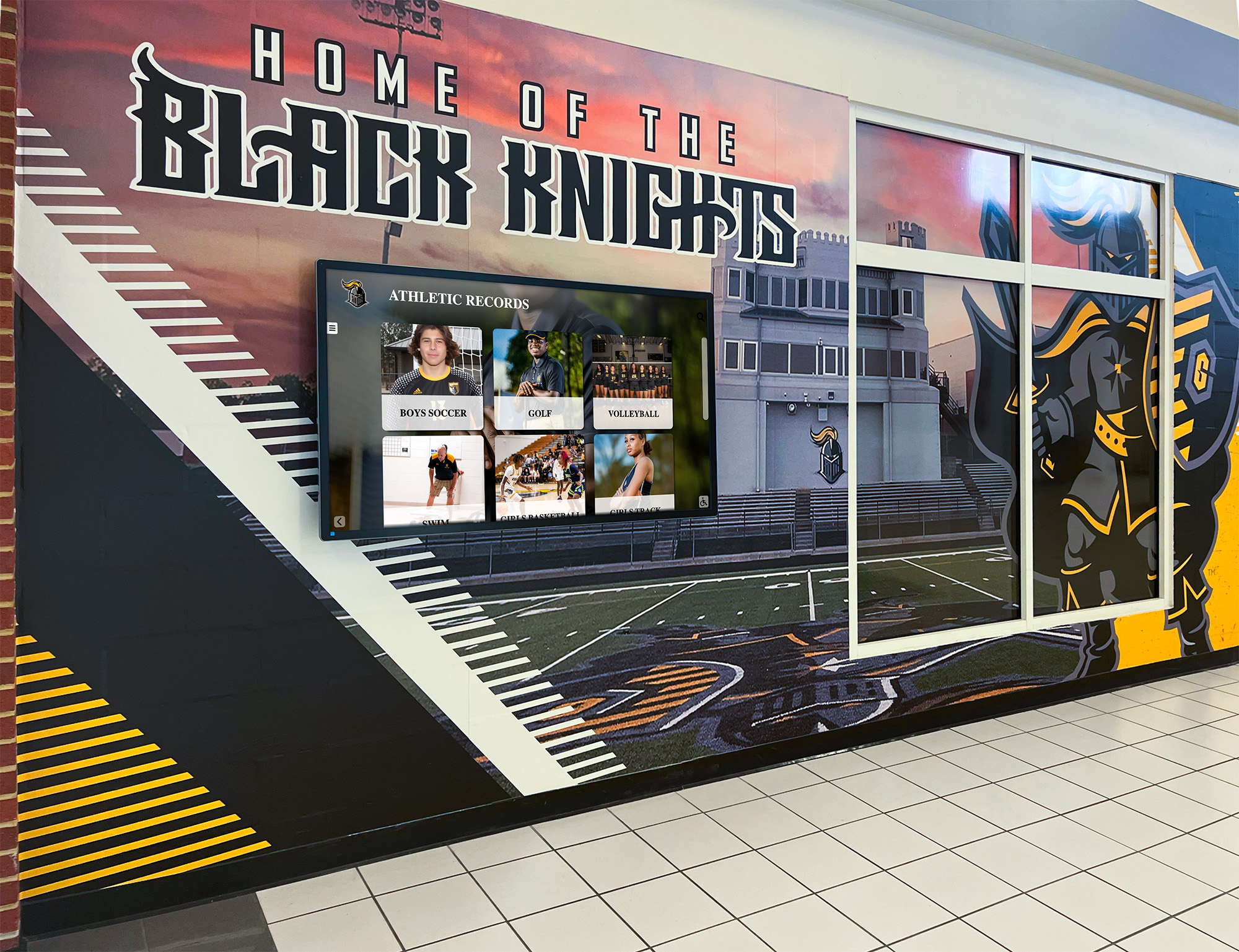
Modern schools integrate digital displays with traditional design elements, maximizing recognition capacity while maintaining aesthetic quality
Digital Class Composite Displays: Core Concepts
Interactive digital systems transform how schools present graduating class information.
What Digital Composite Displays Provide
Modern platforms replace or supplement traditional composites:
Basic Digital Composite Features
- Touchscreen displays showing senior class photographs
- Organized by graduating year with easy year-to-year navigation
- Searchable by student name enabling direct access
- Digital storage for unlimited graduating classes
- Cloud-based content management for remote updates
- Professional presentation matching traditional composite quality
Enhanced Interactive Capabilities
Digital systems enable functionality impossible with printed displays:
- Browse all graduating classes regardless of year
- Search by name finding specific alumni instantly
- Filter by academic honors, athletic achievements, or activities
- View detailed student profiles with comprehensive information
- Include multiple photographs per student
- Integrate video content when available
- Connect related students (siblings, family members, activity participants)
- Access from mobile devices through QR codes
These capabilities transform composites from static displays into engaging institutional archives.
Display Formats and Hardware Options
Schools implement digital composites through various approaches:
Touchscreen Kiosk Installations
Freestanding or wall-mounted interactive displays:
- Commercial-grade touchscreen displays (typically 43-55 inches)
- Professional mounting with concealed cabling
- Always-on operation displaying featured content when idle
- Touch-activated interface for interactive exploration
- Positioned in high-traffic lobbies, hallways, or gathering spaces
- Can replace traditional composite locations or supplement them
Large-Format Wall Displays
Prominent installations for major spaces:
- 65-75+ inch displays or video walls for large lobbies
- Visible from distance displaying rotating class photos
- Touch-enabled or proximity-activated interaction
- Multiple simultaneous users for group exploration
- Integration with architectural features and school branding
- Premium visual impact for main entrances or dedicated alumni spaces
Hybrid Physical-Digital Approaches
Some schools maintain traditional elements while adding digital access:
- Keep recent printed composites (last 5-10 years) on display
- Digital touchscreen provides access to complete historical archive
- QR codes linking to web-based digital yearbook platforms
- Mobile-accessible archives extending beyond physical space
- Print-on-demand for special requests or commemorative purposes
Each approach addresses different space availability, budget constraints, and institutional preferences.
For organizations implementing comprehensive alumni recognition systems, review digital hall of fame solutions that integrate class composites with broader institutional history.
Content Organization and Information Architecture
Effective digital composites require thoughtful content structure:
Navigation Design
Users should easily access desired information:
- Home screen showing all available graduating years
- Year selection displaying that class’s composite grid
- Individual student profiles accessed by tapping photos
- Search functionality finding specific alumni by name
- Filtering options for achievements, activities, or colleges attended
- Related content connecting siblings, activity members, or classmates

Professional touchscreen kiosks provide intuitive interfaces for exploring class composite archives
Student Profile Structure
Individual profiles typically include:
- Professional senior portrait photograph
- Full name and graduation year
- Academic honors and distinctions
- Extracurricular activities and leadership positions
- Athletic achievements and team participation
- Arts involvement (theater, music, visual arts)
- Service activities and community involvement
- College or career destinations when available
- Optional additional photos (candids, activity photos)
- Video content when available (graduation speech excerpts, performances)
This detailed information transforms simple photo composites into comprehensive class archives.
Implementation Benefits for Schools and Universities
Digital composite displays deliver measurable advantages beyond space savings.
Unlimited Historical Capacity
Digital platforms eliminate physical constraints:
Complete Institutional Archives
A single touchscreen display can accommodate:
- Every graduating class throughout institutional history
- Schools founded in 1900s displaying all 100+ graduating classes
- Newer institutions planning for unlimited future growth
- Equal presentation quality for classes from any era
- No favoritism based on wall space availability
- Preservation of historical classes often stored or discarded
This comprehensive capacity honors all graduates equally regardless of when they completed their studies.
Space Efficiency
Physical space comparison:
- Traditional composites: 20-30 linear feet per graduating class
- Digital display: 10-15 square feet total for unlimited classes
- Single 55-inch touchscreen occupies approximately 5 feet of wall space
- Wall-mounted installation maintains hallway accessibility
- Kiosk installation requires minimal floor space
- Freed wall space available for other recognition purposes
Schools document decades of graduating classes while reclaiming hundreds of linear feet of hallway space.
Cost Efficiency Over Time
Long-term financial analysis favors digital solutions:
Traditional Composite Costs
Annual expenses for printed composites:
- Professional photography (often included in senior portrait packages)
- Composite design and layout ($500-1,500 depending on class size)
- Printing and mounting ($2,000-5,000 for typical graduating class)
- Framing or finishing materials ($500-1,000)
- Installation labor and hardware ($300-800)
- Annual total: $3,500-8,500 depending on school size
A school spending $5,000 annually on printed composites invests $50,000 over ten years and $100,000 over twenty years—substantial cumulative costs.
Digital Platform Costs
One-time and ongoing expenses:
- Initial touchscreen hardware ($8,000-15,000 for commercial-grade display and installation)
- Software platform (typically $1,500-3,000 annual subscription)
- Photography digitization for historical classes ($1,000-5,000 one-time)
- Content population (internal staff time or professional service)
- Annual photography integration (minimal after initial setup)
After initial investment, annual costs drop dramatically while capacity expands infinitely.
ROI Timeline
Financial comparison shows:
- Digital system typically reaches cost parity with traditional approach within 3-5 years
- After payback period, ongoing annual costs 60-80% lower than traditional composites
- Eliminated storage, maintenance, and replacement costs for physical displays
- Single solution serving unlimited future graduating classes without additional hardware
These economics make digital platforms increasingly attractive, especially for institutions facing space constraints.
Enhanced Engagement and Interaction
Digital displays create qualitatively different experiences:
Active Exploration vs. Passive Viewing
Traditional composites support only:
- Walking past while glancing at photos
- Stopping to scan for familiar faces
- Reading limited printed information
- Physical proximity required for viewing
Digital displays enable:
- Searching directly for specific alumni by name
- Browsing systematically through graduating classes
- Discovering detailed biographical information
- Exploring connections between classmates
- Accessing content from mobile devices via QR codes
- Sharing discoveries with family and friends
- Spending extended time engaging with content
Research on interactive displays shows that visitors spend 3-5 times longer engaging with touchscreen content compared to static displays, according to museum visitor engagement studies.
Reunion and Alumni Engagement
Digital archives serve alumni events:
- Reunion attendees exploring their graduating class together
- Finding and reminiscing about classmates and teachers
- Comparing class photos across different years
- Parents showing children their own senior portraits
- Grandparents discovering multiple generations of family attendance
- Alumni traveling from distance accessing archives via web platforms
These interactions strengthen alumni connections to institutions while celebrating shared history.
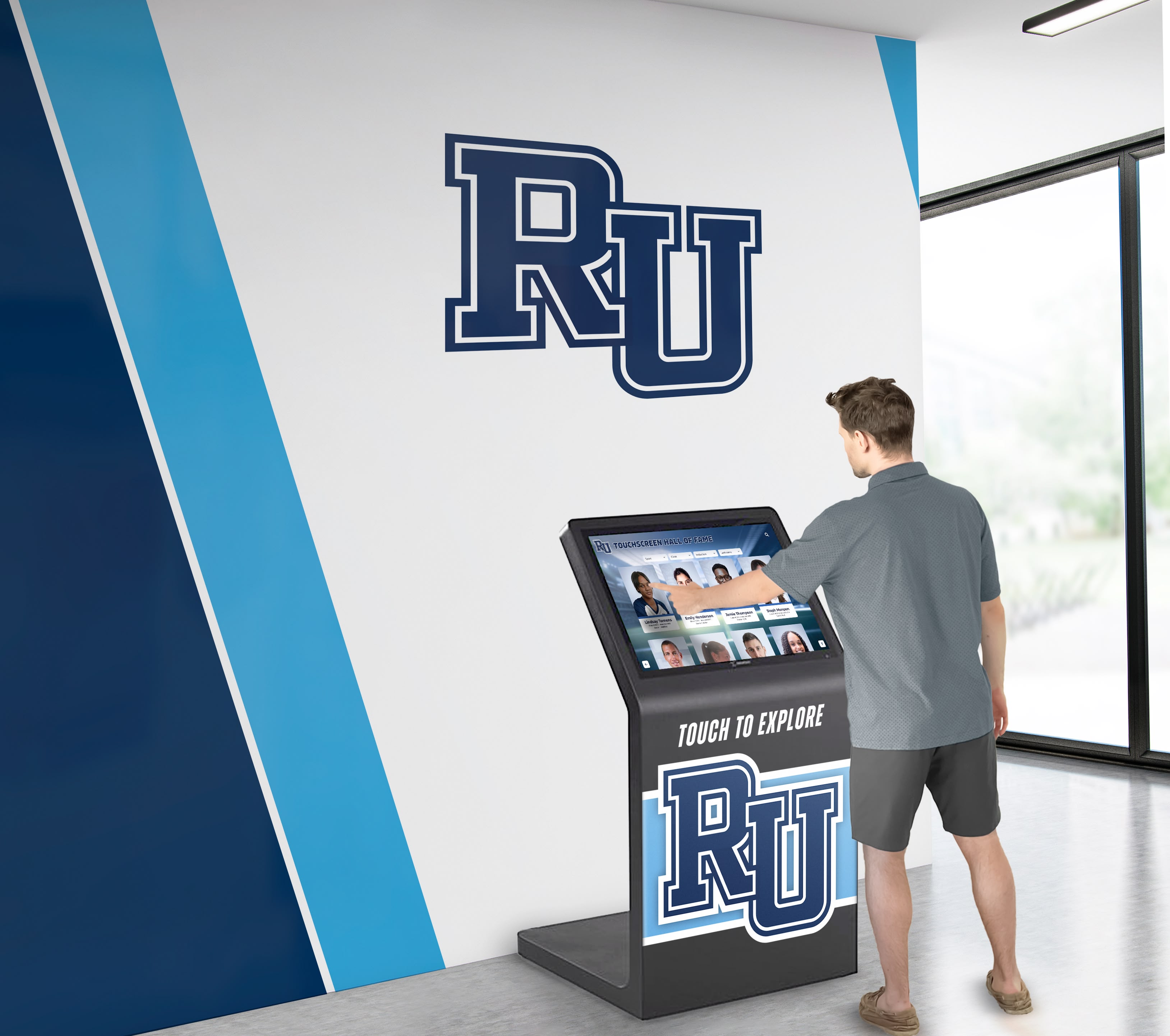
Strategic placement in lobbies and common areas ensures class composite archives remain accessible to diverse audiences
Content Development and Photography Integration
Successful digital composites require systematic content development.
Digitizing Historical Class Composites
Most schools possess extensive printed composite archives:
Assessment and Inventory
Begin with comprehensive audit:
- Locate all existing printed composites (displayed and stored)
- Document condition and photograph quality
- Identify missing years or damaged composites
- Determine whether original digital files exist
- Assess whether printed yearbooks can supplement missing composites
- Prioritize classes for digitization based on condition and demand
This inventory informs digitization scope and budget.
Digitization Methods
Multiple approaches for creating digital archives:
Professional Scanning Services
- Remove composites from frames for flat scanning
- High-resolution scanning (minimum 300 DPI)
- Color correction and image restoration
- Individual photo extraction and cropping
- Metadata creation and organization
- Typical cost: $50-200 per composite depending on size and complexity
In-House Photography
- Photograph displayed composites without removing from walls
- Requires quality camera, proper lighting, and tripod
- Post-processing to correct perspective and enhance quality
- Cost-effective but labor-intensive
- Suitable for schools with photography programs or skilled staff
Yearbook Page Scanning
- When composites unavailable, scan senior pages from yearbooks
- Extract and crop individual portraits
- Lower quality than dedicated composites but serviceable
- Often already available through yearbook digitization projects
Most schools combine methods, professionally scanning priority years while handling others internally.
Organizing Student Information
Photography represents only one element of comprehensive profiles:
Essential Information Fields
Digital platforms should include:
- Full legal name (first, middle, last)
- Preferred or nickname if different from legal name
- Graduation year
- Professional senior portrait photograph
- Basic biographical information if available
Enhanced Profile Content
Expanded information creates richer archives:
- Academic honors (honor roll, AP scholar, valedictorian/salutatorian)
- Athletic teams and achievements
- Fine arts participation (music, theater, visual arts)
- Student government and leadership positions
- Club memberships and activities
- Service organizations and volunteer work
- Academic competitions and awards
- College or career destinations
- Additional photographs (candids, activity photos, team pictures)
- Senior quotes or statements when available
Data Collection Strategies
Gathering comprehensive information requires multiple sources:
- Yearbook pages containing activity listings
- School records (with appropriate privacy considerations)
- Alumni surveys requesting voluntary information updates
- Senior exit surveys collecting destination information
- Social media and professional networks (LinkedIn) with permission
- Reunion registration forms gathering current information
- Family submissions providing missing or updated details
Policies should address privacy considerations, ensuring appropriate consent for information display.
For institutions managing extensive historical photo collections, explore approaches to organizing school archives spanning multiple decades.
Current Student Integration Workflows
Annual senior class integration should be straightforward:
Photography Coordination
Working with senior portrait photographers:
- Request digital files in addition to printed composites
- Specify resolution requirements (minimum 1200x1600 pixels)
- Ensure usage rights permit display in digital formats
- Coordinate file naming conventions (lastname_firstname_2026.jpg)
- Establish delivery timeline and format specifications
- Create agreement covering annual file provision
Many schools already receive digital files, making integration seamless.
Information Collection from Seniors
Systematically gathering profile content:
- Senior questionnaire or online form during final year
- Collect activity information, honors, and achievements
- Request college or career destination information
- Obtain consent for information display
- Optional: collect additional photos for inclusion
- Optional: senior video messages or reflections
Integrating this into senior year activities ensures comprehensive, current information.
Annual Update Process
Once initial archive exists, yearly maintenance requires:
- Import new senior portrait photographs (typically spring of senior year)
- Add collected profile information to database
- Quality review ensuring accurate information
- Publish to touchscreen displays (often timed for graduation)
- Add to web-accessible archive if applicable
- Archive original files for long-term preservation
Streamlined workflows make annual updates manageable even for schools with large graduating classes.
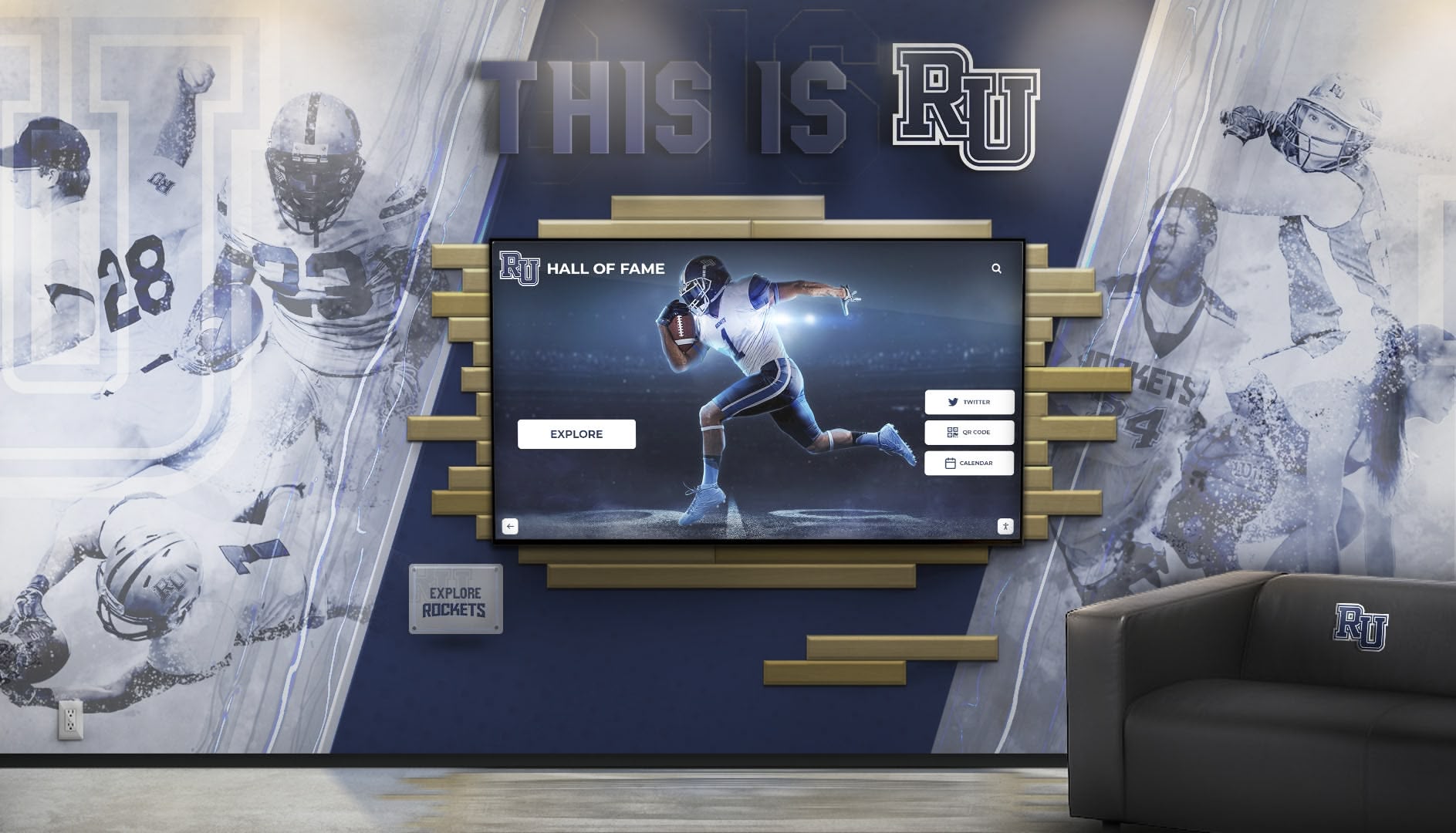
Digital displays integrate seamlessly with existing school aesthetics while providing modern interactive functionality
Technical Implementation Considerations
Successful deployments require appropriate technology infrastructure.
Hardware Selection for School Environments
Educational institutions have specific display requirements:
Commercial-Grade Displays
Schools require durable, reliable equipment:
- Commercial displays rated for continuous operation (16+ hours daily)
- Minimum 3-year warranty with advance replacement options
- Capacitive or infrared touch technology (responsive and durable)
- Anti-glare screens reducing sunlight interference
- Vandal-resistant mounting and bezels
- Typical sizes: 43-55 inches for individual kiosks, 65-75+ inches for large lobby installations
Consumer-grade displays fail quickly in school environments despite lower costs.
Installation Considerations
Professional installation ensures longevity:
- Wall-mounted displays require secure mounting to studs or masonry
- Freestanding kiosks need stable bases preventing tipping
- Cable concealment maintaining clean appearance
- Power and network connectivity (wired Ethernet preferred)
- Accessible service panels for maintenance
- Height appropriate for diverse users (ADA considerations)
Quality installation prevents damage while ensuring accessibility.
Location and Placement
Strategic positioning maximizes engagement:
- High-traffic areas (main entrances, cafeteria approaches, auditorium lobbies)
- Sufficient space for multiple simultaneous users
- Adequate lighting without direct sunlight on screens
- Proximity to power and network infrastructure
- Visible signage directing visitors to displays
- Integration with existing architectural features and design elements
Schools often place displays near traditional composite locations, easing transition for community members.
Software Platforms and Content Management
Backend systems significantly impact usability:
Essential Software Features
Digital composite platforms require specific capabilities:
- Intuitive content management system for non-technical staff
- Bulk import for large historical photo collections
- Search and filtering functionality
- Responsive design supporting various screen sizes
- Offline functionality maintaining operation during network outages
- Usage analytics showing popular content and engagement patterns
- Accessibility features (screen reader compatibility, high contrast modes)
- Multi-display management from centralized dashboard
- Scheduled content rotation and featured graduate highlighting
Cloud-Based vs. Local Solutions
Platform architecture considerations:
Cloud-Based Platforms
- Content updates from any internet-connected device
- Automatic backup and disaster recovery
- No local server maintenance requirements
- Requires reliable internet connectivity
- Ongoing subscription costs
- Seamless software updates and feature additions
Locally-Hosted Solutions
- One-time software licensing rather than subscriptions
- Operates independently of internet connectivity
- Requires in-house technical expertise
- Manual backup and update procedures
- Greater initial control but higher maintenance burden
Most schools select cloud platforms for simplicity and ongoing support.
Integration Capabilities
Advanced platforms connect with existing systems:
- Student information systems (SIS) for current student data
- Alumni databases for updated information and engagement tracking
- Website embedding for web-accessible archives
- Mobile apps extending access beyond physical displays
- Social sharing functionality promoting organic visibility
Integration reduces manual data entry while maintaining data consistency.
For schools implementing comprehensive digital recognition systems, explore institutional touchscreen solutions supporting multiple content types.
Privacy, Security, and Policy Considerations
Schools must address important policy questions:
Information Display Policies
Establish clear guidelines regarding:
- What information displays publicly (names, photos, activities)
- Opt-out procedures for students/alumni preferring exclusion
- Parental consent requirements for minor students
- Handling of sensitive information (addresses, contact details never displayed)
- Correction procedures for inaccurate information
- Archival vs. current information distinctions
Written policies prevent misunderstandings while ensuring appropriate practices.
Photography Rights and Permissions
Clarify usage rights:
- School ownership or licensing of senior portrait photographs
- Photographer contracts specifying digital display permissions
- Model releases for activity and candid photographs
- Family-submitted photos requiring usage consent
- Historical photograph copyright considerations
- Commercial vs. educational use distinctions
Legal review ensures compliant usage.
Data Security
Protecting information requires:
- Secure content management system access (strong passwords, multi-factor authentication)
- Role-based permissions limiting editing capabilities
- Audit logs tracking content changes
- Regular backups preventing data loss
- FERPA compliance for student information handling
- Secure disposal of physical composites containing personal information
Robust security protects both institutional and individual interests.
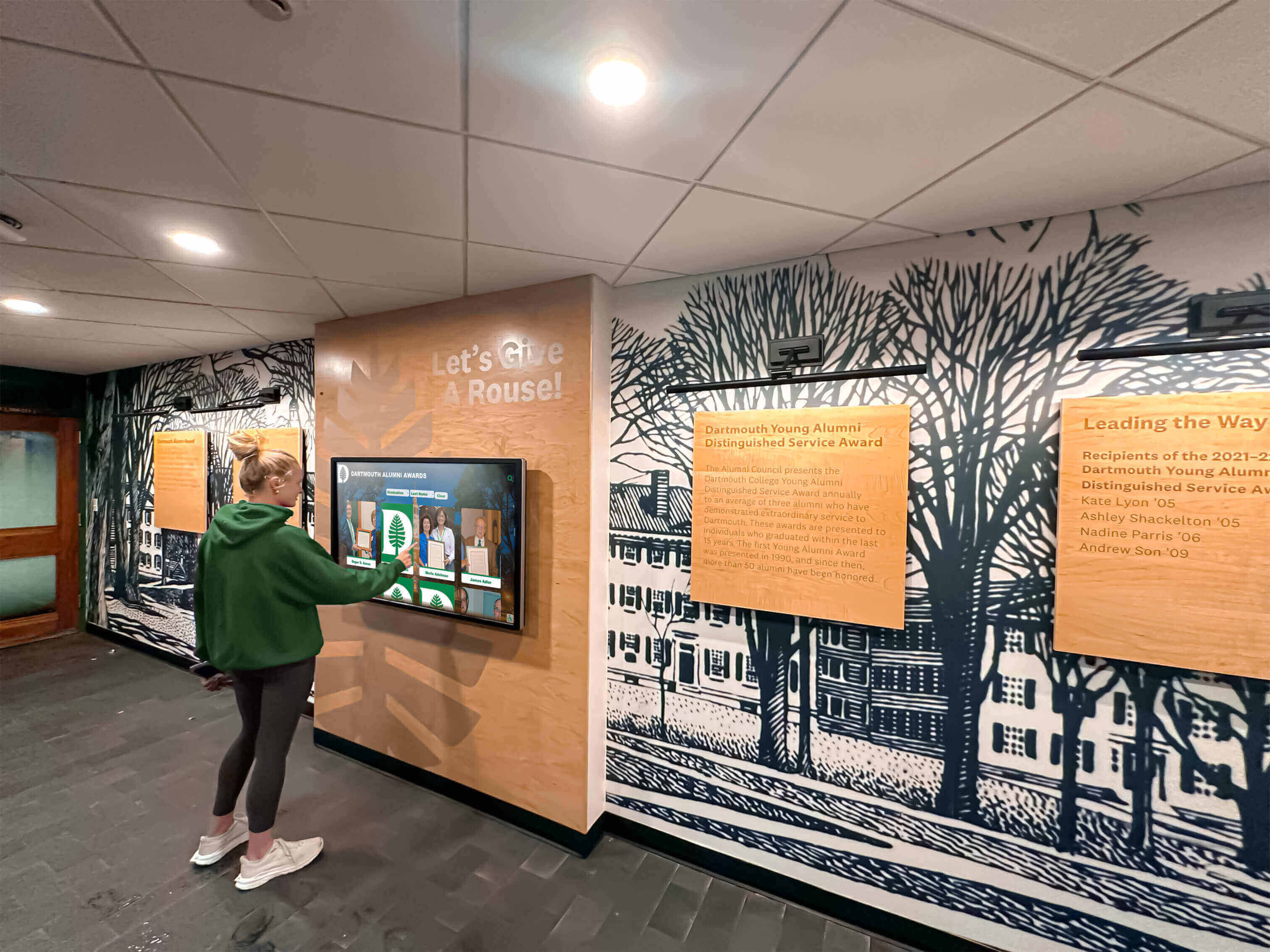
Intuitive interfaces enable students and visitors to explore class archives independently without assistance
Expanding Beyond Basic Class Composites
Digital platforms support enhanced content extending beyond traditional composites.
Yearbook Integration
Comprehensive digital archives combine composites with full yearbooks:
Complete Yearbook Digitization
Many schools digitize entire yearbooks:
- Page-by-page scanning of historical yearbooks
- Searchable text through optical character recognition (OCR)
- Browse complete yearbooks year by year
- Zoom capabilities for detailed viewing
- Preservation of complete class history beyond just senior composites
Combined class composites and yearbooks create definitive institutional archives accessible through single interface.
Activity and Organization Pages
Beyond individual seniors, yearbooks document:
- Athletic team photographs and accomplishments
- Music and performing arts groups
- Academic clubs and competitions
- Student government and leadership organizations
- Candid photographs capturing daily school life
- Faculty and staff directories
This content adds context showing complete class experiences.
For institutions developing comprehensive yearbook archives, review approaches to digitizing historical yearbook collections.
Multimedia Enhancement
Digital platforms support content impossible with printed materials:
Video Content Integration
When available, video enriches archives:
- Graduation ceremony excerpts
- Senior speeches and presentations
- Student government addresses
- Athletic highlights and achievements
- Performing arts performances
- Class trip and event documentation
- “Senior reflections” video messages
Video transforms static archives into dynamic memories.
Audio Content
Historical recordings preserve voices:
- Oral history interviews with alumni
- Period music from school performances
- Historical radio broadcasts or announcements
- Special event audio recordings
Audio provides emotional connection impossible with photographs alone.
“Where Are They Now” Alumni Updates
Digital systems support ongoing engagement:
Post-Graduation Updates
Platforms can incorporate:
- College or university attendance information
- Career and professional accomplishments
- Military service recognition
- Community leadership and service
- Notable achievements and recognitions
- Current location or contact preferences
- Family connections (alumni children, siblings)
Update Mechanisms
Gathering current information requires:
- Alumni survey campaigns at milestone reunions (5, 10, 25 years)
- LinkedIn and professional network integration with permission
- Reunion registration forms requesting updates
- Alumni association databases sharing information
- Self-service update portals allowing direct information submission
- Social media mentions and submissions from classmates
Current information increases relevance for returning alumni while inspiring current students.
Cross-Generational Connections
Digital archives enable discovery impossible with printed composites:
Family Legacy Displays
Interactive systems can highlight:
- Siblings who attended the institution
- Parent-child alumni connections
- Multi-generational family attendance
- Related cousins and extended family
- Alumni who married other alumni
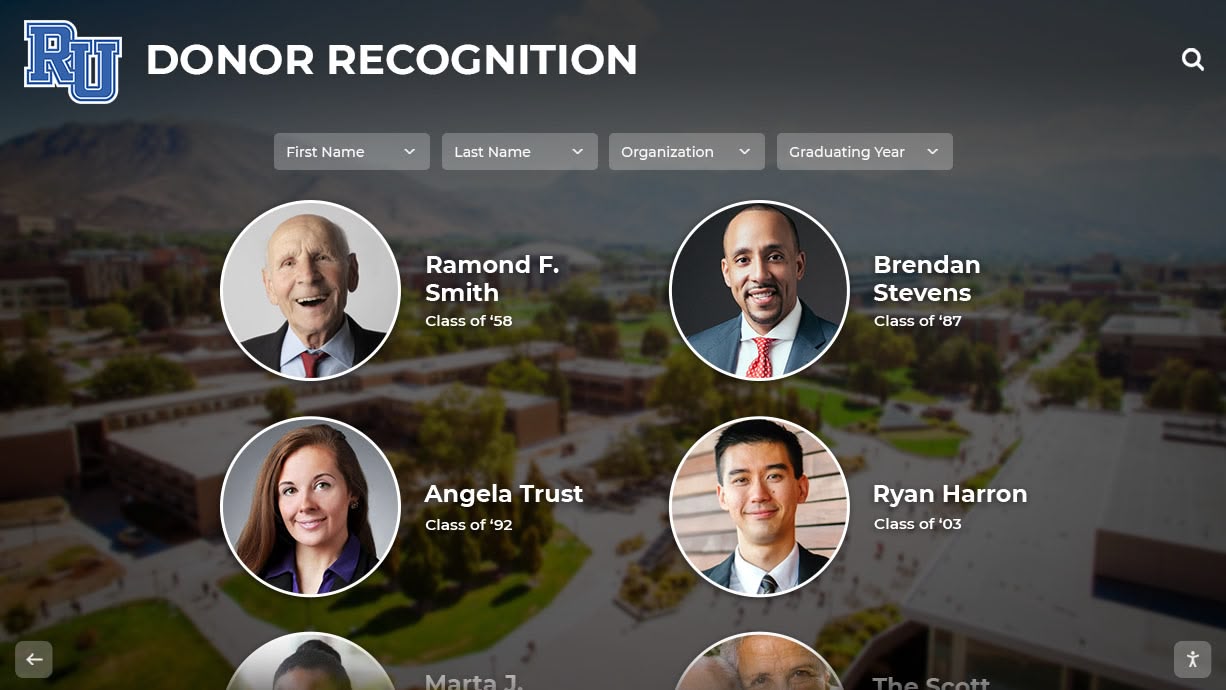
Advanced systems connect related alumni, revealing family legacies across generations
Activity and Interest Connections
Link alumni through shared experiences:
- Members of same athletic teams or performance groups
- Participants in identical activities across different years
- Recipients of same awards or honors
- Students attending same colleges
- Graduates pursuing similar careers or professions
These connections create community among alumni who never overlapped during school attendance.
Measuring Success and Engagement
Effective implementations track meaningful metrics:
Usage Analytics
Modern platforms provide detailed engagement data:
Quantitative Metrics
Track concrete usage indicators:
- Total interactions and session counts
- Average session duration
- Most-viewed graduating classes
- Most-searched alumni names
- Popular search terms and filters
- Peak usage times and dates
- Unique vs. returning users (when trackable)
These metrics demonstrate ROI while informing content improvement.
Popular Content Identification
Analytics reveal what engages audiences:
- Graduating classes receiving most attention
- Individual profiles viewed most frequently
- Multimedia content (videos, additional photos) engagement
- Search patterns revealing information gaps
- Exit points indicating navigation confusion
Data guides prioritization for content expansion and enhancement.
Qualitative Feedback
Complement analytics with direct feedback:
Visitor Observations
Staff notice behavioral patterns:
- Groups gathering around displays during reunions
- Students comparing current class to historical composites
- Families finding relatives across multiple generations
- Extended engagement sessions indicating deep interest
- Return visitors exploring repeatedly
Observational insights reveal engagement quality beyond quantitative metrics.
Formal Feedback Collection
Systematic assessment through:
- Brief touchscreen surveys after interactions
- Reunion attendee questionnaires
- Parent and family feedback during school events
- Alumni surveys about archive usefulness
- Focus groups with diverse stakeholder populations
Feedback guides continuous improvement while demonstrating value to stakeholders.
Engagement Benchmarks
Typical successful implementations show:
- 40-60% of reunion attendees engaging with digital archives
- Average session durations of 3-5 minutes (vs. seconds for printed composites)
- 70-80% positive satisfaction ratings from users
- Increased alumni engagement in other school activities
- Social media sharing extending reach beyond campus visitors
These benchmarks help schools assess implementation success.

Well-designed interfaces encourage exploration and engagement across diverse audience demographics
Implementation Process and Timeline
Systematic planning ensures successful deployment.
Phase 1: Planning and Assessment (2-3 Months)
Stakeholder Engagement
Involve key groups early:
- Administrative leadership securing budget and approval
- Alumni relations identifying historical priorities
- IT department addressing technical requirements
- Facilities management confirming installation locations
- Photography or yearbook coordinators regarding content sources
- Alumni representatives providing community perspective
Early involvement builds support while preventing surprises.
Requirements Definition
Establish clear objectives:
- Content scope (how many years to digitize initially)
- Budget allocation and funding sources
- Timeline expectations and priority milestones
- Technical specifications and infrastructure needs
- Success metrics and evaluation criteria
- Ongoing maintenance responsibilities
Documentation guides vendor selection and implementation.
Vendor Evaluation
If using commercial platform, assess:
- Product demonstrations showing actual functionality
- Reference checks with similar institutions
- Contract terms including licensing, support, and training
- Scalability for future expansion
- Integration capabilities with existing systems
- Total cost of ownership (initial and ongoing)
Thorough evaluation prevents buyer’s remorse.
Phase 2: Content Development (3-6 Months)
Historical Digitization
Systematic archiving of existing composites:
- Prioritize recent years (last 10-20) for immediate value
- Digitize oldest vulnerable composites for preservation
- Plan phased approach spreading costs across multiple budget cycles
- Establish quality standards for scanning or photography
- Organize files systematically for efficient platform import
- Create metadata spreadsheets organizing information
Phased digitization makes large projects manageable.
Information Collection
Gathering comprehensive profile data:
- Extract information from yearbooks for historical classes
- Survey current seniors for detailed profiles
- Request alumni association assistance contacting graduates
- Publicize project seeking family submissions and corrections
- Establish ongoing procedures for annual updates
Collaborative approaches accelerate content development.
Phase 3: Installation and Launch (1-2 Months)
Hardware Installation
Professional deployment:
- Coordinate with facilities for installation scheduling
- Complete electrical and network infrastructure work
- Install and test touchscreen displays
- Configure software and load initial content
- Quality assurance testing with diverse users
- Staff training on content management and troubleshooting
Testing prevents launch issues.
Soft Launch and Refinement
Initial deployment:
- Launch with core content even if not 100% complete
- Monitor usage and gather early feedback
- Address technical issues and navigation confusion
- Refine content based on initial engagement patterns
- Expand content systematically based on priorities
Iterative approach allows learning while delivering value.
Public Announcement
Official launch:
- Announce at major school events or reunions
- Social media and website publicity
- Local media coverage for noteworthy implementations
- Alumni newsletter features
- Signage directing visitors to displays
Promotion maximizes awareness and usage.
Phase 4: Ongoing Operation (Continuous)
Annual Content Updates
Systematic maintenance:
- Integrate new senior class each year
- Add historical classes as resources permit
- Incorporate alumni updates and corrections
- Refresh featured content periodically
- Expand multimedia content when available
Regular updates maintain freshness and accuracy.
Technical Maintenance
Ensure reliable operation:
- Clean touchscreens weekly
- Monitor for hardware or software issues
- Apply software updates and security patches
- Review analytics monthly identifying problems
- Respond to user feedback and reported issues
Consistent maintenance prevents deterioration.
For schools seeking comprehensive implementation support, explore institutional digital archive solutions including training and content services.
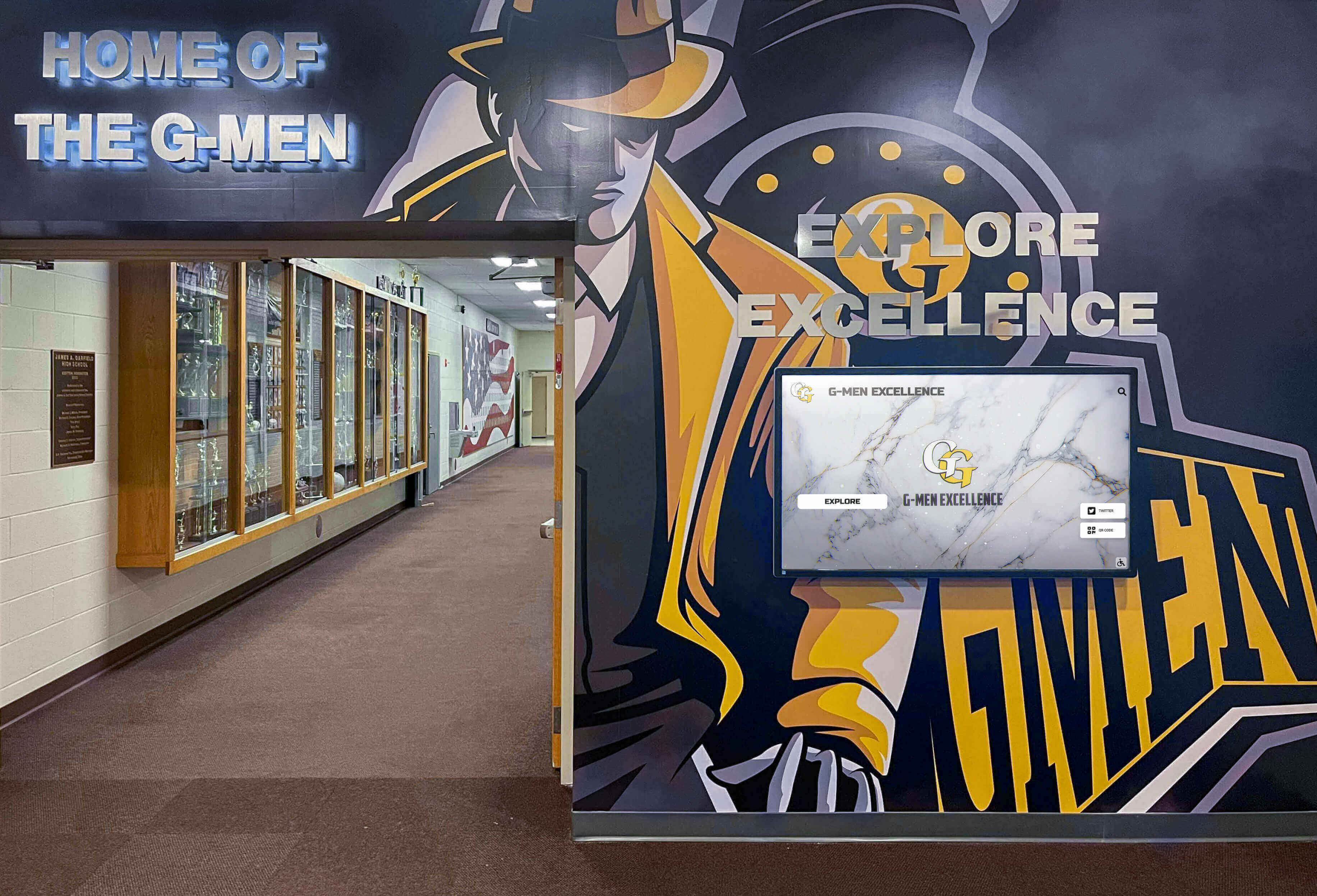
Combining digital displays with traditional trophy cases and murals creates comprehensive recognition environments
Case Applications Across Institution Types
Different educational settings benefit from tailored approaches.
High Schools
Secondary schools represent primary composite users:
Typical High School Implementations
Common approaches:
- Display in main lobby or entrance area
- 43-55 inch touchscreen kiosk
- Complete archive from school founding or last 50 years
- Annual senior class integration workflow
- Connection to athletic and activities recognition
- QR codes enabling mobile access during reunions
Engagement Patterns
High schools see particular usage:
- Current students comparing their class to parents’ classes
- Reunion attendees rediscovering classmates
- Prospective families exploring school history during tours
- Community members connecting across generations
- Alumni returning for athletic events or performances
Universities and Colleges
Higher education institutions adapt approaches for larger scale:
College-Specific Considerations
Universities require different strategies:
- Typically organized by school, college, or program within university
- Much larger graduating classes (hundreds or thousands annually)
- Integration with comprehensive alumni engagement platforms
- Multiple display locations across campus
- Web accessibility more critical given distributed alumni
- Often combined with athletic hall of fame and donor recognition
Professional and Graduate Programs
Graduate schools adapt formats:
- Medical, law, and business schools maintain distinct class traditions
- Smaller cohorts enabling more detailed profiles
- Career outcome information particularly relevant
- Professional networks and connections highlighted
- Reunion engagement especially strong
Private and Independent Schools
Independent institutions leverage composites for community building:
Independent School Approaches
Distinct characteristics:
- Smaller class sizes enabling comprehensive profiles
- Strong alumni networks and engagement traditions
- Integration with development and fundraising
- Emphasis on family legacy and multi-generational attendance
- Often combined with donor recognition in same displays
Boarding Schools
Unique considerations:
- International alumni requiring web-accessible archives
- Particularly strong nostalgia and emotional connections
- Comprehensive documentation of residential life and traditions
- House or dormitory affiliations creating additional connections
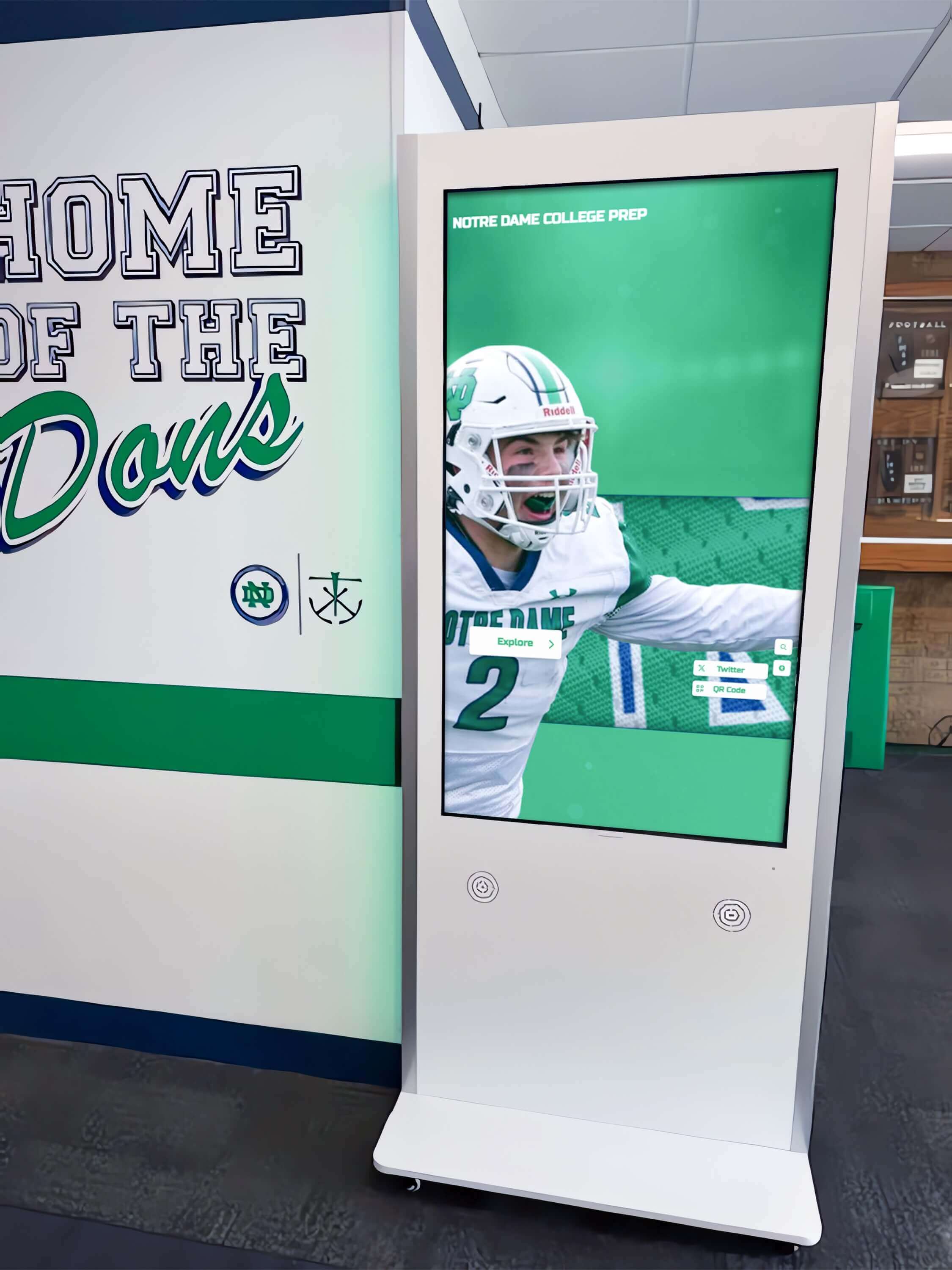
Professional kiosk installations provide durable, accessible displays suitable for high-traffic campus environments
Future Trends and Emerging Capabilities
Technology continues expanding what digital composites can provide.
Artificial Intelligence and Automation
AI enables new functionality:
Automated Information Enhancement
Machine learning can:
- Extract and organize information from yearbook pages automatically
- Recognize faces matching individuals across multiple photographs
- Suggest connections between alumni based on activities and interests
- Generate biographical summaries from multiple text sources
- Identify and flag missing or incomplete information for attention
These capabilities reduce manual effort while improving content comprehensiveness.
Personalized Recommendations
AI can create individualized experiences:
- Suggest related alumni based on viewing patterns
- Highlight connections between user and displayed individuals
- Customize featured content for different audience segments
- Predict popular content meriting prominence
Personalization increases relevance and engagement.
Enhanced Interactivity
Emerging interface technologies:
Voice and Natural Language
Voice-enabled search:
- Speak names for hands-free searching
- Ask conversational questions about classes or individuals
- Accessibility improvement for visitors with limited mobility
- Multilingual voice support expanding access
Voice interfaces reduce interaction friction.
Augmented Reality Integration
AR extends physical displays:
- Smartphone apps overlaying information on printed composites
- Virtual “life-size” composite experiences
- Historical scene reconstruction showing campus changes
- Take-home AR experiences extending engagement beyond campus
AR bridges physical and digital recognition approaches.
Social and Collaborative Features
Connected experiences:
Social Sharing and Tagging
Enable viral engagement:
- Share individual profiles or classes on social media
- Tag classmates in photographs
- Comment and contribute memories
- Crowdsource missing information or corrections
- Organize virtual reunions around digital archives
Social features extend institutional reach while gathering valuable content.
Collaborative Storytelling
Engage alumni in archive development:
- Alumni-contributed photographs and media
- Story submissions about memorable experiences or classmates
- Oral history interviews conducted and shared by alumni
- Peer recognition and celebration features
Collaborative approaches distribute work while increasing personal investment.
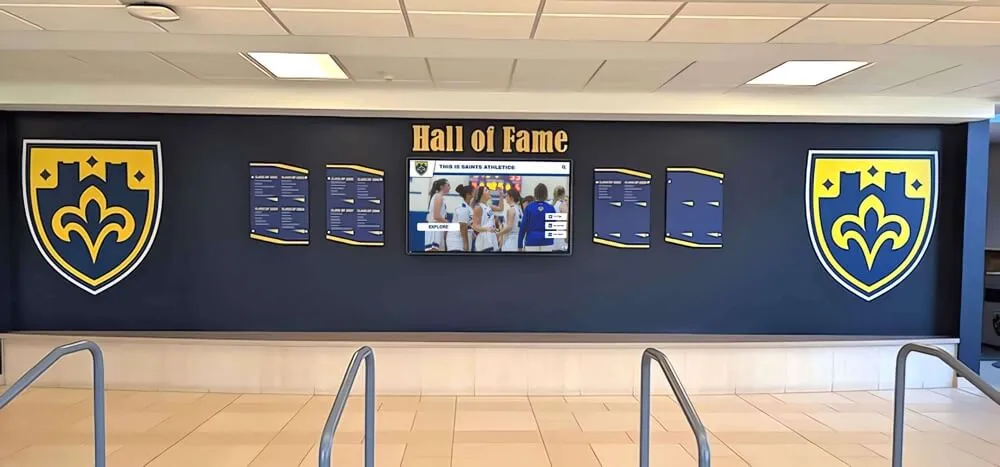
Premium installations combine architectural elements with digital technology for visually striking recognition displays
Conclusion: Honoring Every Graduate Through Modern Technology
Digital interactive class composite displays represent more than space-saving alternatives to printed photographs—they fundamentally transform how schools celebrate and preserve graduating class legacies. By replacing physical constraints with unlimited digital capacity, institutions create comprehensive archives honoring every graduate throughout history while delivering engaging experiences that static displays cannot match.
The benefits extend beyond practical considerations. Alumni who engage with interactive archives spend minutes rather than seconds exploring class history, discovering connections across generations, and reconnecting with classmates and memories. Students gain tangible connection to institutional tradition, seeing themselves as the latest chapter in ongoing stories spanning decades or centuries. Families discover multi-generational legacies, strengthening emotional bonds to schools their relatives attended.
Transform Your Class Composites into Interactive Archives
Discover how Touch Archive helps schools create engaging digital class composite displays that preserve every graduating class throughout history, creating searchable yearbook archives accessible to students, alumni, and visitors.
Book a DemoImplementation need not overwhelm. Schools begin with recent graduating classes, establishing workflows for annual senior integration while systematically digitizing historical composites as resources permit. Cloud-based platforms eliminate technical complexity, enabling staff to manage content through intuitive interfaces without specialized expertise. Professional support services assist with historical digitization, content development, and ongoing maintenance for schools lacking internal resources.
Financial analysis consistently favors digital approaches. After initial investment recovered through eliminated annual composite printing costs within 3-5 years, ongoing expenses drop dramatically while capacity expands infinitely. The single touchscreen display serving your next fifty graduating classes costs far less than fifty individual printed composites while delivering exponentially greater value through enhanced engagement and accessibility.
Most importantly, digital class composites position schools as forward-thinking institutions embracing technology while honoring tradition. Rather than choosing between printed composites and digital innovation, many schools discover hybrid approaches maintaining beloved traditions while adding modern enhancements. The goal remains unchanged: celebrating every graduating senior with recognition that endures throughout their lifetime and beyond.
Your graduating classes deserve comprehensive celebration regardless of when they completed their studies. Alumni merit recognition equal to current students. Families should discover their educational legacies spanning generations. Digital interactive class composite displays make these ideals achievable, transforming physical space limitations into unlimited digital opportunity while creating memorable experiences that strengthen institutional community.
Ready to explore how interactive class composites can preserve and celebrate your graduating class history? Request a demonstration of Touch Archive solutions designed specifically for schools seeking to honor every graduate through engaging digital recognition.
Sources:































