



Schools, athletic programs, and organizations face mounting challenges preserving and displaying achievements appropriately. Traditional recognition walls reach capacity, trophy cases overflow, and physical plaques require costly updates whenever information changes. Facilities managers struggle to showcase decades of accomplishments within limited physical space while keeping displays current and accessible to diverse audiences.
Modern recognition demands exceed what traditional displays can deliver. Visitors expect searchable content, multimedia presentations, and accessibility features that static plaques simply cannot provide. Organizations need systems accommodating unlimited achievements while remaining easily updatable without carpentry work or expensive engraving each time honors are bestowed.
This comprehensive guide explores Rocket Recognition—a digital touchscreen display solution addressing these challenges through interactive technology that preserves institutional history, celebrates current achievements, and creates engaging experiences for schools, athletic programs, and organizations managing substantial recognition needs.
Recognition serves fundamental purposes across educational institutions and organizations. Whether honoring student achievement, preserving athletic program history, acknowledging donor contributions, or celebrating employee excellence, how we recognize matters deeply. These systems shape institutional culture, inspire current participants, and preserve legacy for future generations.

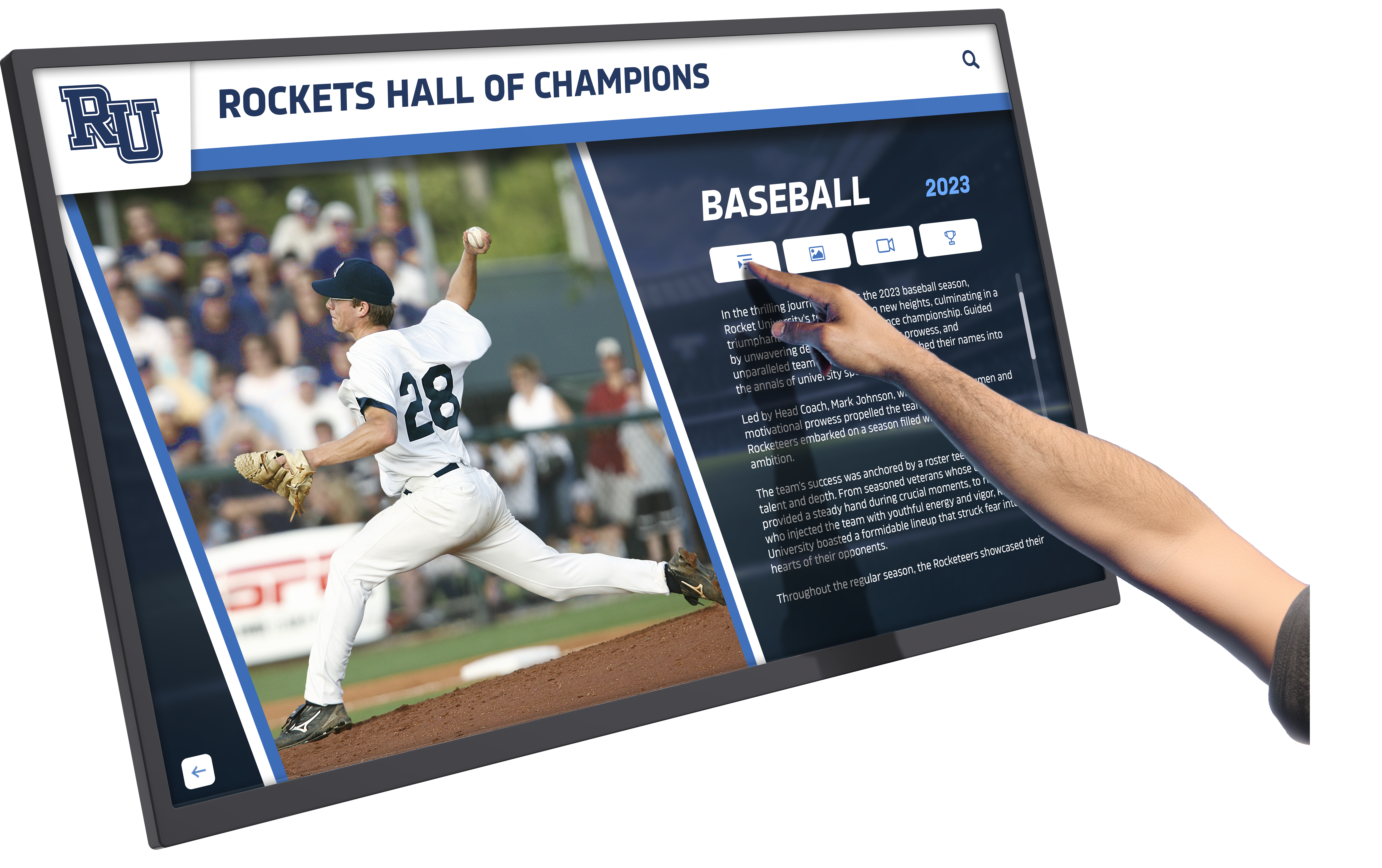
Interactive recognition displays engage visitors through touchscreen technology, enabling exploration of achievements and institutional history
Understanding Modern Recognition Challenges
Organizations managing recognition programs encounter consistent obstacles with traditional display methods.
Space Constraints and Capacity Limitations
Physical recognition systems impose inflexible boundaries:
The Wall Space Problem
Traditional recognition faces fundamental limitations:
- Available wall space eventually fills completely
- Adding honorees requires removing existing plaques
- Expansion demands construction and facility modifications
- Multiple achievement categories compete for limited space
- Historical achievements get relegated to storage
- Balancing current and historical recognition proves difficult
Trophy Case Capacity Issues
Physical trophy displays encounter similar constraints:
- Cases fill rapidly as programs accumulate achievements
- Older trophies get stored away to accommodate new ones
- Display priority decisions create institutional tensions
- Rotating displays means many achievements remain invisible
- Glass cases restrict accessibility and detailed information
- Maintenance and cleaning require physical access
According to digital transformation research, organizations with robust recognition programs experience 31% lower voluntary turnover rates and report 12% higher productivity metrics, demonstrating that effective recognition directly impacts institutional success.
Update and Maintenance Burdens
Traditional recognition creates ongoing administrative challenges:
Cost and Complexity of Updates
Physical displays require substantial resources:
- Engraving new plaques costs $50-200 per item
- Installation requires professional services
- Corrections to existing plaques demand replacement
- Annual updates accumulate significant expenses
- Timeline from recognition decision to display spans weeks
- Coordinating updates across multiple displays proves challenging
Information Accuracy Challenges
Static displays struggle maintaining current information:
- No mechanism for corrections without replacement
- Additional context cannot be added after installation
- Historical information lacks detail due to space constraints
- Visitor questions cannot be answered by static text
- Multilingual content requires duplicate displays
- Accessibility accommodations remain limited
Schools managing athletic recognition programs particularly feel these constraints as achievements accumulate across multiple sports, seasons, and decades.
What Is Rocket Recognition?
Rocket Recognition represents a purpose-built digital recognition platform developed by Rocket Alumni Solutions specifically for educational institutions, athletic programs, and organizations managing substantial recognition needs.
Core Platform Components
The Rocket Recognition system consists of integrated hardware and software components:
Hardware Infrastructure
Physical touchscreen installations provide the visitor interface:
- Commercial-grade touchscreen displays (typically 43-75 inches)
- Ultra-responsive capacitive touch technology supporting 10+ simultaneous touch points
- Dedicated media players optimized for continuous operation
- Professional mounting solutions for various installation environments
- Connectivity infrastructure enabling remote content management
- Optional QR code integration for mobile device access
Software Platform
Cloud-based content management enables remote administration:
- Web-based interface accessible from any internet-connected device
- Template libraries designed specifically for recognition applications
- Media management for photos, videos, and documents
- Scheduling system for time-based content changes
- User permission controls for collaborative management
- Analytics tracking visitor engagement and usage patterns
Recognition-Specific Features
Unlike generic digital signage, Rocket Recognition includes purpose-built capabilities:
Achievement Documentation
Comprehensive profile systems capture complete recognition stories:
- Individual honoree profiles with photos, bios, and achievements
- Team recognition with rosters, statistics, and season summaries
- Historical timeline views connecting decades of achievements
- Award and honor tracking across multiple categories
- Career progression documentation
- Multimedia integration including video tributes and photo galleries
Search and Discovery
Visitors explore content through intuitive interfaces:
- Name-based searching finding specific honorees instantly
- Year-based browsing revealing achievements by timeframe
- Category filtering (sports, academics, service, donors)
- Alphabetical directories for systematic exploration
- Featured content spotlighting notable achievements
- Related content connections linking associated honorees
For organizations managing donor recognition alongside athletic and academic achievements, integrated platforms accommodate multiple recognition categories within unified systems.
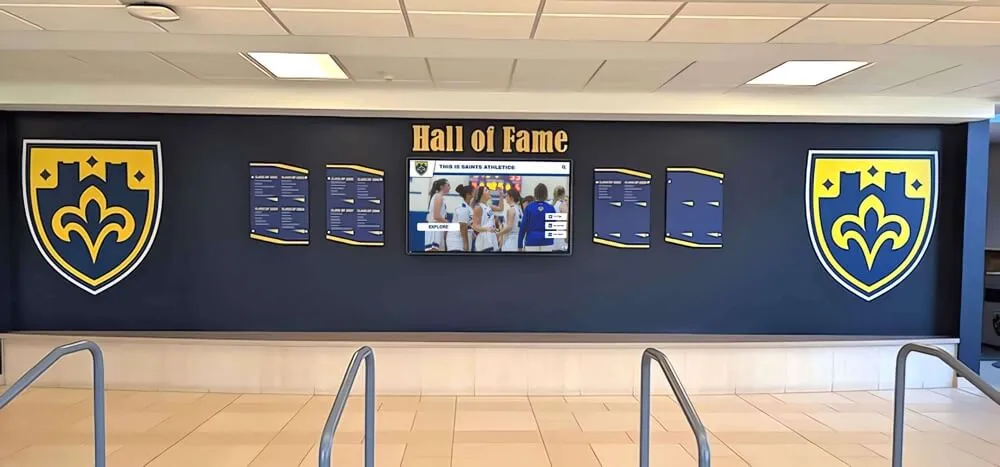
Modern recognition installations combine traditional visual elements with interactive digital displays for comprehensive recognition
Key Advantages of Digital Recognition Systems
Digital touchscreen recognition delivers measurable improvements across multiple dimensions.
Unlimited Capacity Without Construction
Digital systems eliminate physical space constraints entirely:
Infinite Recognition Capacity
Database-driven systems accommodate unlimited growth:
- Add honorees indefinitely without space concerns
- Include comprehensive information for each individual
- Preserve complete institutional history from founding forward
- Document all achievement categories simultaneously
- Maintain detailed records including statistics, awards, and stories
- Never remove past honorees to make room for new ones
Flexible Organizational Structures
Digital organization supports multiple categorization schemes:
- Browse by achievement type (athletic, academic, service, leadership)
- Filter by timeframe (decade, year, season)
- Organize by category (sport, department, donor level, award type)
- Create custom collections highlighting specific themes
- Feature rotating spotlight content
- Enable cross-referencing between related honorees
Schools implementing digital hall of fame systems report the capacity to finally document complete institutional history rather than focusing only on recent years constrained by available wall space.
Instant Updates Without Installation Costs
Content management occurs remotely through administrative dashboards:
Immediate Content Changes
Updates deploy instantly across connected displays:
- Add new honorees within minutes of approval
- Correct information immediately without replacement costs
- Update achievements as new accomplishments occur
- Add contextual information enhancing existing profiles
- Modify organizational structures as needs evolve
- Publish scheduled updates for specific dates and times
Cost Elimination
Digital updates eliminate traditional expenses:
- Zero engraving costs for new honorees
- No installation labor for content changes
- Immediate corrections without plaque replacement
- Updates deployable from anywhere with internet access
- Multiple administrators can manage content collaboratively
- Bulk updates possible for systematic changes
Enhanced Visitor Engagement
Interactive systems transform passive viewing into active exploration:
Engagement Metrics
Research on digital recognition displays reveals schools consistently report visitors spending 5-10 minutes exploring interactive displays compared to 30-60 seconds glancing at traditional cases. This 10x engagement increase demonstrates how interactivity fundamentally changes recognition experiences.
Discovery and Exploration
Touchscreen interfaces encourage deeper engagement:
- Visitors search for personal connections (alumni, family, hometown)
- Athletes explore program history and record progression
- Prospective students discover institutional traditions
- Donors see their contributions recognized appropriately
- Community members connect with institutional legacy
- Multiple visitors can explore simultaneously with large displays
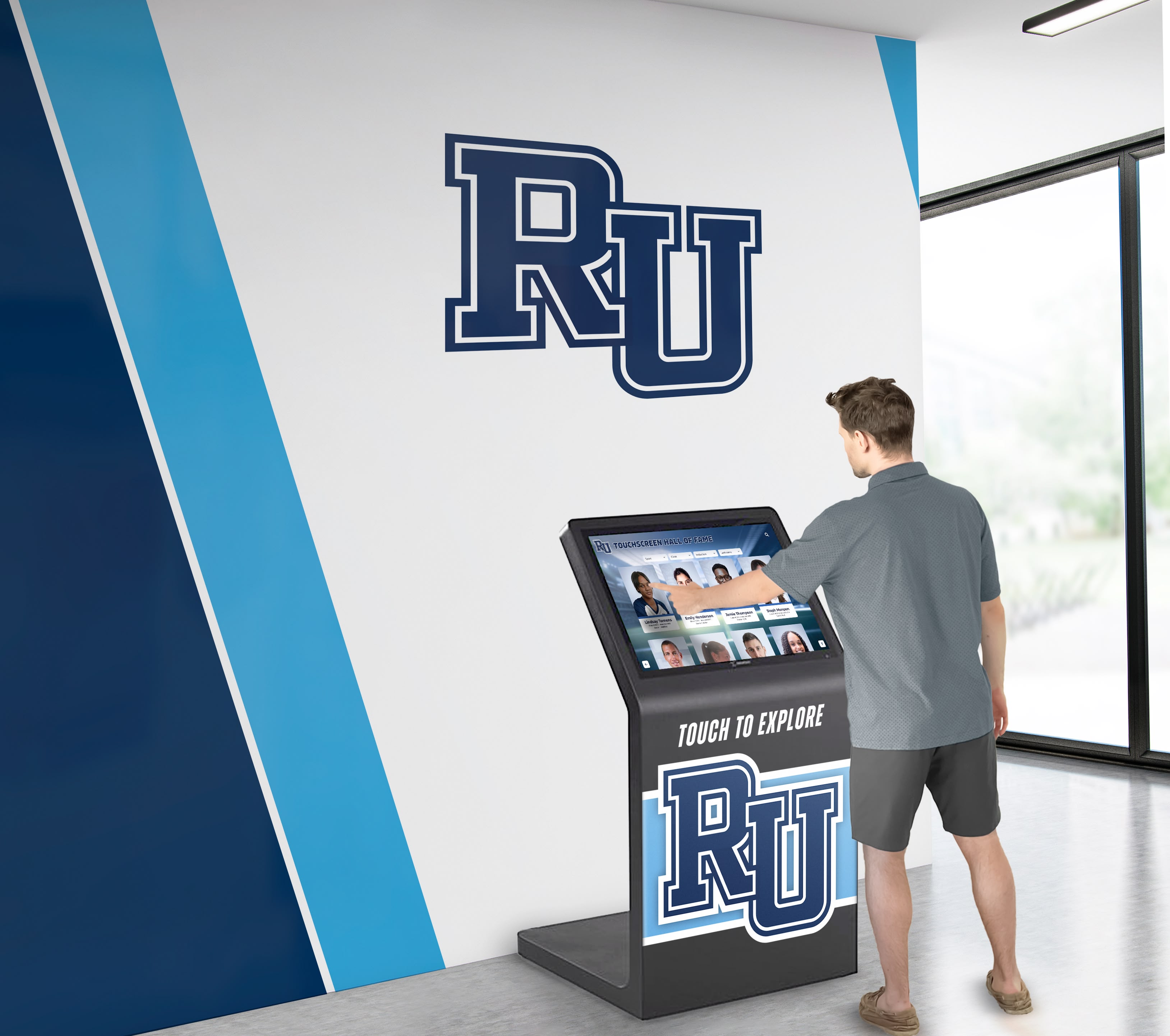
Strategic lobby placement ensures maximum visibility and visitor engagement with recognition displays
Comprehensive Multimedia Integration
Digital platforms accommodate rich content impossible with physical displays:
Visual Storytelling
Multimedia capabilities enhance recognition narratives:
- High-resolution photographs capturing achievements
- Video compilations and tributes
- Audio narration and interviews
- Historical photographs documenting institutional evolution
- Championship game footage and performance recordings
- Career progression photo galleries
Contextual Information
Detailed content provides complete stories:
- Extended biographical information
- Statistical achievements and records
- Award and honor documentation
- Career highlights and memorable moments
- Connections to teams, coaches, and related honorees
- Historical context situating achievements within broader timeframes
Athletic programs particularly benefit from multimedia recognition capabilities, enabling documentation of championship seasons through photos, videos, statistics, and roster information impossible to convey through traditional plaques.
Common Implementation Applications
Rocket Recognition systems serve diverse recognition needs across institutional contexts.
Athletic Hall of Fame and Sports Recognition
Athletic programs represent the most common implementation:
Comprehensive Athletic Documentation
Sports recognition encompasses multiple categories:
- Hall of fame inductees with career achievements
- Championship teams and tournament success
- Individual record holders across statistical categories
- All-conference and all-state selections
- College signees and professional athletes
- Coaching history and accomplishments
Multi-Sport Management
Schools manage recognition across entire athletic programs:
- Dedicated sections for each sport
- Seasonal achievement documentation
- Historical record boards updated automatically
- Team photo archives spanning decades
- Senior recognition and career tributes
- Jersey retirement ceremonies and permanent recognition
Academic Achievement Recognition
Academic excellence recognition parallels athletic applications:
Scholar Recognition Categories
Academic achievements deserve equal prominence:
- Valedictorians and salutatorians
- National Merit Scholars
- Honor roll and distinguished scholars
- Academic all-state selections
- Perfect ACT/SAT score achievers
- Academic competition success
- Scholarship recipients
Program-Specific Recognition
Academic departments maintain specialized recognition:
- STEM competition achievements
- Arts and music accomplishments
- National Honor Society inductees
- Academic club leadership
- Research and publication recognition
- College acceptance documentation
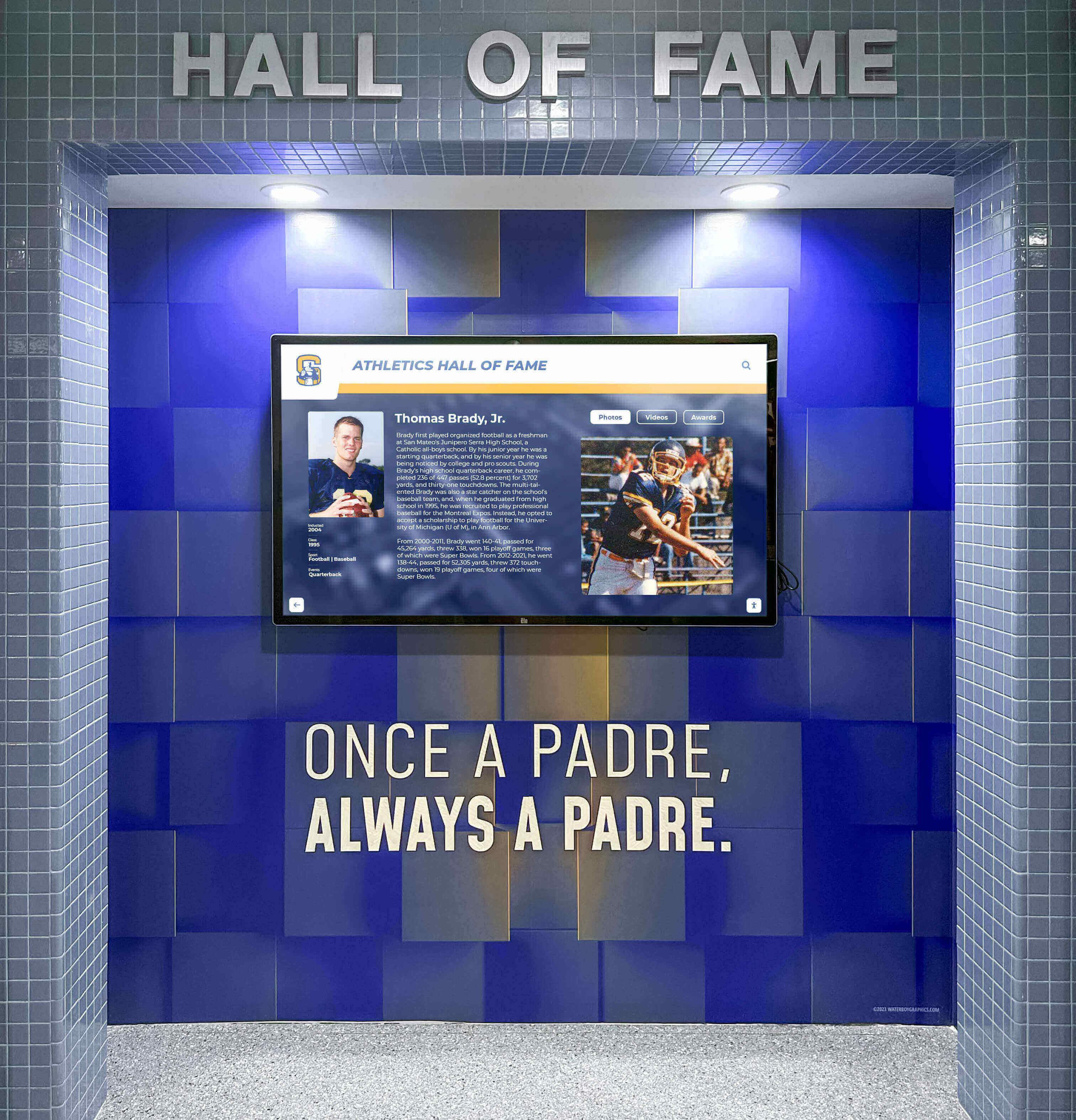
Athletic facilities provide natural placement for sports-focused recognition displays
Donor Recognition and Development
Development offices utilize recognition systems for donor stewardship:
Donor Wall Functionality
Digital donor recognition offers distinct advantages:
- Unlimited donor capacity across all giving levels
- Immediate updates as new gifts are received
- Recognition spanning multiple campaigns and initiatives
- Anonymous donor accommodation
- Lifetime giving aggregation across decades
- Memorial and tribute gift recognition
- Pledge fulfillment tracking and acknowledgment
Campaign Visualization
Development initiatives benefit from dynamic displays:
- Campaign thermometers and progress tracking
- Giving level visualization
- Impact stories showing donor contribution effects
- Recognition of in-kind and non-monetary contributions
- Historical giving trends and institutional support
- Endowment fund documentation
Organizations implementing donor recognition displays report enhanced donor relationships and improved stewardship through prominent, easily updatable recognition.
Employee and Organizational Recognition
Corporate and institutional workplaces deploy recognition systems:
Employee Achievement Recognition
Workplace recognition categories include:
- Years of service milestones
- Performance excellence awards
- Retirement recognition and career tributes
- Safety achievements and records
- Innovation and improvement initiatives
- Leadership and mentorship acknowledgment
- Team accomplishment documentation
Organizational History
Institutional memory preservation benefits organizations:
- Leadership timeline and executive history
- Organizational milestone documentation
- Historical photograph archives
- Founding and growth narrative
- Location history for multi-site organizations
- Mission and values reinforcement through stories

Professional touchscreen kiosks provide polished recognition experiences in high-traffic institutional areas
Implementation Process and Considerations
Successful recognition display deployments follow systematic planning and execution phases.
Needs Assessment and Planning
Implementation begins with clear understanding of recognition objectives:
Defining Recognition Scope
Organizations determine what content the system will manage:
- Identify all recognition categories requiring accommodation
- Determine historical depth (how many years backward)
- Establish honoree selection criteria and processes
- Define what information profiles should include
- Identify multimedia content availability (photos, videos)
- Determine update frequency and content management responsibilities
Space and Placement Strategy
Physical installation considerations shape effectiveness:
- High-traffic areas ensure maximum visibility
- Multiple displays may serve different audiences or content types
- Sight lines and viewing distances inform display sizing
- Ambient lighting affects screen visibility and placement
- ADA accessibility requirements influence mounting heights
- Electrical and network infrastructure availability
Schools typically achieve optimal impact with 2-4 strategically placed displays rather than single-location installations—enabling content specificity while maintaining comprehensive recognition across facilities.
Content Development and Migration
Successful implementations require thorough content preparation:
Historical Content Gathering
Existing recognition requires digitization:
- Photograph physical plaques, trophies, and displays
- Gather athletic record books and statistical archives
- Collect historical photographs and documents
- Compile biographical information for honorees
- Verify historical accuracy of records and achievements
- Organize content by category, year, and type
Profile Creation
Individual honoree entries require standardized information:
- Biographical details (years, positions, affiliations)
- Achievement documentation and statistics
- Awards and honors received
- Photographic content
- Video content where available
- Contextual narratives providing detail
Content Standards
Consistency ensures professional presentation:
- Standardized profile templates
- Photo specifications (resolution, cropping, orientation)
- Biographical information formats
- Statistical presentation conventions
- Naming conventions and terminology
- Copyright compliance for photographs and media
Technical Installation
Physical deployment involves coordinated technical execution:
Hardware Installation
Professional mounting ensures reliable operation:
- Display mounting per manufacturer specifications
- Media player installation and configuration
- Network connectivity establishment (wired preferred over wireless)
- Power supply and cable management
- Protective measures for high-traffic areas
- QR code placement for mobile access
Software Configuration
Platform setup establishes operational parameters:
- Administrator account creation and permission assignment
- Template selection and customization
- Content organization and categorization structures
- Search functionality configuration
- Accessibility feature enablement
- Analytics and tracking activation
Content Population
Prepared content migrates into the platform:
- Bulk import processes for large historical datasets
- Individual profile creation and refinement
- Media upload and association with honorees
- Category assignment and organizational tagging
- Featured content designation
- Launch date scheduling
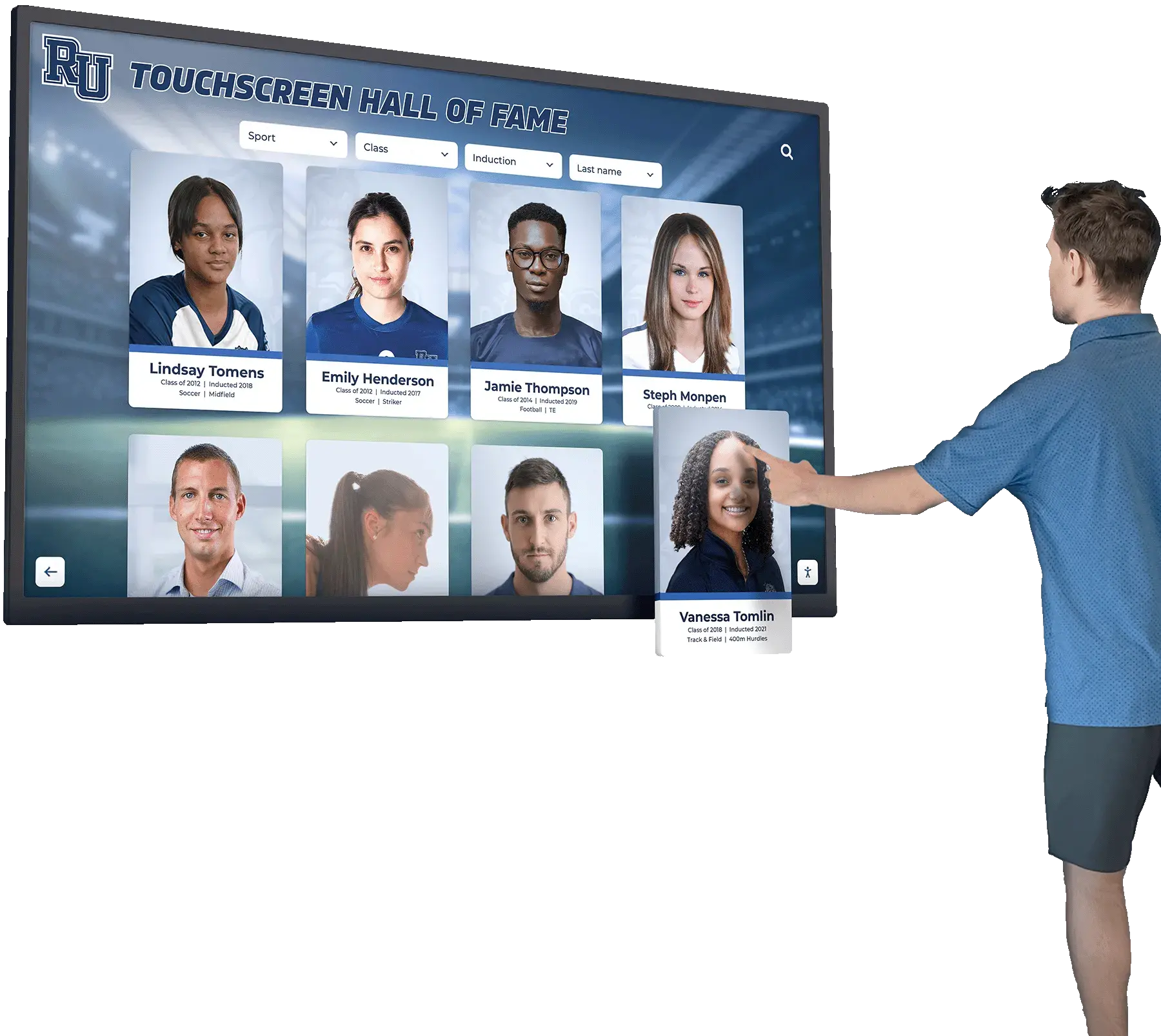
Intuitive touchscreen interfaces enable visitors of all ages to explore recognition content independently
Ongoing Management and Best Practices
Successful recognition systems require sustained attention and management.
Content Management Workflows
Systematic processes ensure displays remain current:
Regular Update Schedules
Establish consistent content rhythms:
- Post-season athletic updates adding new achievements
- Academic year-end honor roll and award updates
- Annual donor recognition refreshes
- Quarterly featured content rotations
- Monthly spotlight honoree changes
- Event-driven updates (hall of fame inductions, retirements)
Content Approval Processes
Maintain accuracy and appropriateness:
- Designated content managers with update authority
- Review procedures for new honoree additions
- Fact-checking protocols for statistics and achievements
- Photo quality and rights verification
- Proofreading before publication
- Version control and change tracking
Multi-Administrator Collaboration
Recognition often spans departments requiring coordination:
- Athletic directors managing sports recognition
- Development officers updating donor content
- Alumni coordinators maintaining graduate information
- Department heads contributing specialized recognition
- Role-based permissions preventing unauthorized changes
- Communication protocols coordinating updates
Visitor Engagement Strategies
Maximize recognition system impact through active promotion:
Discovery Promotion
Ensure audiences know displays exist and how to use them:
- New visitor orientation including display demonstrations
- Social media posts highlighting featured honorees
- Email communications announcing updates
- Event programming around display (viewing parties, induction ceremonies)
- Signage directing visitors to display locations
- QR codes enabling mobile access to content
Content Freshness
Regular updates maintain visitor interest:
- Featured content rotations preventing static appearance
- Seasonal themes connecting to current activities
- Anniversary recognition highlighting historical milestones
- Recent achievement highlighting proving currency
- Interactive challenges encouraging exploration (scavenger hunts, trivia)
- Visitor suggestions for content additions
Performance Monitoring and Optimization
Analytics inform content and engagement improvements:
Usage Analytics
Track how visitors interact with displays:
- Total session counts and daily patterns
- Average interaction duration
- Most-viewed profiles and content types
- Search query patterns revealing interests
- Category browsing patterns
- Peak usage times informing content scheduling
Content Performance
Identify what resonates with audiences:
- Which profiles generate longest engagement
- Multimedia content (photos, videos) versus text-only engagement
- Featured content effectiveness
- Search success rates
- Navigation patterns revealing usability issues
- Visitor feedback and suggestions
Investment Considerations and ROI
Recognition system investments involve multiple cost categories and value considerations.
Implementation Investment Components
Understanding complete project costs enables proper budgeting:
Hardware Costs
Physical equipment represents substantial initial investment:
- Commercial touchscreen displays: $2,000-8,000 per screen depending on size
- Media players and computing hardware: $500-1,500 per display
- Professional mounting systems: $300-800 per installation
- Protective enclosures for high-traffic areas: $500-2,000
- Network infrastructure improvements: varies by facility
- Installation labor: $500-2,000 per display
Complete touchscreen recognition systems for schools typically range from $10,000-30,000 for initial implementation depending on display count and size.
Software and Service Costs
Ongoing platform fees enable system operation:
- Annual software subscription: $2,000-5,000 per year
- Content management platform access
- Cloud hosting and data storage
- Technical support and system updates
- Training and onboarding services
- Analytics and reporting tools
Content Development Costs
Historical content digitization requires investment:
- Professional photography for historical content
- Content entry and profile creation (often internal staff time)
- Historical research and verification
- Media editing and optimization
- Initial template customization
- Launch content population
Return on Investment Analysis
Digital recognition delivers measurable value:
Hard Cost Savings
Digital systems eliminate recurring traditional expenses:
- Engraving costs: $50-200 per plaque eliminated annually
- Physical trophy case expansion: $5,000-20,000 avoided
- Wall construction for additional recognition: $10,000+ avoided
- Maintenance and cleaning of physical displays reduced
- Update installation labor eliminated
- Plaque replacement for corrections avoided
Organizations adding 20-30 honorees annually save $1,000-4,000 yearly in engraving costs alone.
Soft Value Creation
Additional benefits resist precise quantification but provide real value:
- Enhanced recruitment showing program excellence
- Improved donor relations through prominent, updated recognition
- Strengthened institutional culture and pride
- Increased engagement with institutional history
- Accessibility improvements serving broader audiences
- Space reclamation eliminating construction needs
Comparative Analysis
Traditional recognition carries hidden costs:
- Wall space eventually requires facility expansion
- Physical capacity limitations necessitate selective recognition
- Update delays diminish recognition impact
- Maintenance demands continuous attention
- Limited information restricts storytelling
- Inaccessibility excludes portions of audiences
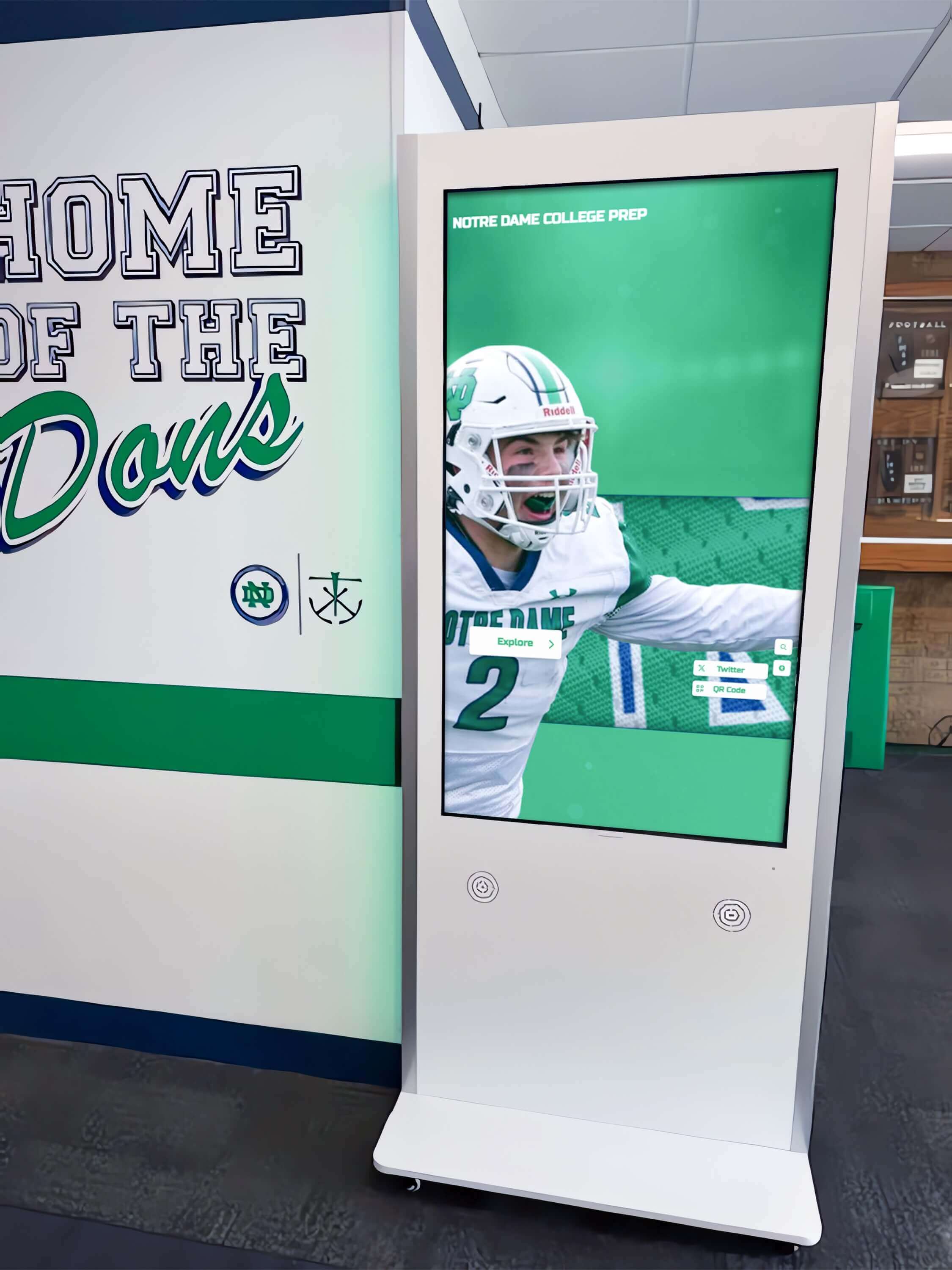
Hallway installations capture foot traffic between classes and events, maximizing recognition visibility
Technical Specifications and Requirements
Understanding technical requirements ensures successful deployment.
Hardware Requirements
Display hardware must meet institutional operation demands:
Display Specifications
Commercial-grade touchscreens provide necessary reliability:
- Screen size: 43-75 inches typical for recognition applications
- Resolution: 4K (3840 x 2160) minimum for clear text legibility
- Touch technology: Projected capacitive supporting 10+ simultaneous touches
- Brightness: 350-500 nits for indoor installations
- Operating hours: 16-18 hours daily capability
- Commercial warranty: 3-year minimum coverage
- Portrait or landscape mounting capability
Computing Hardware
Dedicated media players drive display content:
- Processor: Intel i5 or equivalent minimum
- RAM: 8GB minimum, 16GB recommended
- Storage: 128GB SSD minimum
- Operating system: Windows 10/11 Pro or specialized appliance OS
- Graphics: Integrated graphics sufficient for recognition content
- Remote management capability for updates and troubleshooting
Connectivity Requirements
Network infrastructure enables remote management:
Network Specifications
Reliable connectivity proves essential:
- Wired Ethernet connection strongly recommended (wireless acceptable but less reliable)
- Minimum 10 Mbps download speed
- Static IP address or DHCP reservation
- Firewall rules permitting content management system access
- Remote desktop access for troubleshooting
- Guest network isolation for public-facing displays
Security Considerations
Public-facing displays require security measures:
- Operating system hardening removing unnecessary services
- Automatic security update installation
- Remote monitoring and management software
- Physical security preventing unauthorized access to hardware
- Content management authentication and authorization
- Regular security audits and compliance reviews
Software Requirements
Platform capabilities determine what recognition needs can be addressed:
Essential Platform Features
Recognition-specific functionality requirements:
- Unlimited honoree capacity without per-profile charges
- Customizable profile templates matching institutional needs
- Media management supporting photos, videos, and documents
- Robust search functionality (name, year, category, keyword)
- Responsive touch interface optimized for standing interaction
- Remote content management via web browser
- Scheduled publishing for time-based content activation
- Analytics and usage reporting
- Accessibility features (screen reader compatibility, text resizing, high contrast)
- Multi-language support for diverse audiences
Administrative Requirements
Content management capabilities for ongoing operation:
- Role-based access controls (administrators, editors, viewers)
- Draft and approval workflows for content review
- Bulk import for historical content migration
- Media library with organizational capabilities
- Template editing without coding requirements
- Content preview before publication
- Version history and rollback capability
- User activity logging for auditing
Accessibility and Inclusion Considerations
Recognition systems must serve all community members.
Universal Design Principles
Accessible design benefits everyone:
Physical Accessibility
Installation decisions affect who can use displays:
- Mounting height accommodating wheelchair users (bottom of screen no higher than 48 inches)
- Approach space allowing wheelchair maneuvering
- Touch target sizes meeting minimum accessibility standards (minimum 44x44 pixels)
- Text size legibility from standing distance
- Interface reach zones accessible without stretching
- Audio output option for screen reader compatibility
Digital Accessibility
Software implementation must meet accessibility standards:
- WCAG 2.1 Level AA compliance (legal requirement for public institutions)
- Screen reader compatibility for visitors with vision impairments
- Keyboard navigation alternatives to touch
- Color contrast ratios meeting accessibility standards
- Captions for video content
- Alternative text for images
- Adjustable text sizes and high contrast modes
Inclusive Content Practices
Recognition content should reflect institutional diversity:
Representative Coverage
Ensure all community segments receive recognition:
- Gender balance across achievement categories
- Representation across demographic groups
- Recognition of diverse achievement types beyond athletics
- Historical acknowledgment addressing complete institutional story
- Multilingual content serving non-English speakers
- Accessible language avoiding unnecessary jargon
Sensitivity Considerations
Recognition occasionally involves sensitive contexts:
- Memorial and posthumous recognition handled appropriately
- Privacy considerations for current students and employees
- Name and pronoun preferences respected
- Historical context provided for older achievements reflecting different eras
- Balanced presentation avoiding perceived favoritism
- Procedures for content disputes and removal requests
Comparison with Alternative Recognition Approaches
Digital touchscreen recognition represents one option among several alternatives.
Traditional Physical Displays
Physical recognition remains common despite limitations:
Plaque and Trophy Case Advantages
Physical displays offer certain benefits:
- No power or network requirements
- One-time cost without ongoing fees
- Familiar format widely understood
- Tangible connection to achievement
- No technology learning curve
- Permanent nature provides security
Physical Display Limitations
However, significant constraints exist:
- Fixed capacity requiring eventual expansion
- High per-item update costs ($50-200 per plaque)
- Space consumption limiting scope
- Limited information depth
- No accessibility features
- Update timeline (weeks for engraving and installation)
- Maintenance requirements (cleaning, repair)
Print-Based Recognition
Printed materials provide alternative documentation:
Yearbook and Program Book Recognition
Printed publications offer certain advantages:
- Personal copies for honorees
- Annual documentation of achievements
- Historical record preservation
- Distribution to broad audiences
- Familiar traditional format
Print Limitations
Significant constraints affect usability:
- Single point-in-time snapshot
- No updates or corrections possible after printing
- Limited distribution reach
- Storage and preservation challenges
- Discovery difficult (no search functionality)
- Production costs recurring annually
- Environmental impact of paper consumption
Website-Based Recognition
Digital web recognition provides another alternative:
Online Recognition Advantages
Web-based recognition offers benefits:
- Accessible from anywhere with internet
- Unlimited capacity
- Easy updates without special tools
- Search functionality
- Multimedia integration
- Lower implementation costs
Website Recognition Limitations
However, important constraints exist:
- Requires visitor initiative to access
- No physical presence in facilities
- Less engagement than interactive touchscreens (research shows physical touchscreen engagement 10x higher than website visits)
- Competition with other web content
- Depends on promotion and awareness
- Less suitable for guests and visitors without prior knowledge
Hybrid Approaches
Many organizations combine multiple recognition methods:
Complementary Recognition Systems
Comprehensive recognition often integrates multiple approaches:
- Primary touchscreen displays in high-traffic areas providing interactive engagement
- Traditional plaques for most prestigious individual honors maintaining tangible recognition
- Print programs for annual documentation providing personal copies
- Website presence enabling remote access and broad distribution
- Mobile app integration extending access beyond physical displays
- QR codes connecting physical and digital recognition
This layered strategy addresses diverse audience preferences and recognition contexts while maximizing visibility across channels.

Responsive touch interfaces enable intuitive navigation through recognition content
Future Trends in Digital Recognition
Recognition technology continues advancing with broader technological trends.
Enhanced Interactivity
Future systems will offer richer engagement:
Augmented Reality Integration
AR technology may enhance recognition experiences:
- Mobile device overlays providing additional context
- Historical scene recreation showing past achievements in context
- Interactive 3D trophy and award displays
- Spatial audio providing narrated content
- Virtual tours through institutional history
- Photo opportunities with historical figures and teams
Gesture and Voice Control
Alternative input methods may complement touch:
- Gesture recognition enabling touchless interaction (particularly relevant post-pandemic)
- Voice commands for search and navigation
- Accessibility improvements for users with mobility limitations
- Multi-user simultaneous interaction
- Distance interaction for large displays
Artificial Intelligence Applications
AI capabilities may enhance recognition systems:
Intelligent Content Organization
Machine learning could improve discovery:
- Automatic content tagging and categorization
- Relationship mapping between honorees
- Recommendation engines suggesting related content
- Predictive search anticipating queries
- Natural language search understanding conversational queries
- Pattern recognition identifying historically significant connections
Automated Content Enhancement
AI could assist content development:
- Automatic photo enhancement improving historical image quality
- Audio transcription for video content
- Caption generation for accessibility
- Content summarization creating readable profiles from detailed information
- Language translation enabling multilingual recognition
Integration with Broader Institutional Systems
Recognition systems may connect with other platforms:
Data Integration
Connected systems could enable:
- Automatic recognition content population from student information systems
- Athletic statistics integration from sports management platforms
- Donor information synchronization from advancement databases
- Employment data integration for staff recognition
- Event management system connections triggering recognition updates
- Social media integration sharing recognition content
Extended Ecosystem
Recognition could extend across channels:
- Mobile apps providing personalized recognition access
- Email notifications when relevant recognition is added
- Social sharing enabling honorees to promote their recognition
- Virtual reality experiences for remote audiences
- Interactive alumni directories integrating recognition with networking
Getting Started with Rocket Recognition
Organizations interested in digital recognition systems should follow systematic evaluation and implementation processes.
Initial Assessment
Begin with clear understanding of needs and objectives:
Recognition Inventory
Document current recognition approaches:
- List all recognition categories currently maintained
- Identify existing physical displays and their contents
- Estimate number of honorees across categories
- Assess historical content availability (photos, statistics, documents)
- Evaluate current recognition gaps and unmet needs
- Determine stakeholder priorities for recognition improvements
Requirements Definition
Clarify what success looks like:
- Define primary recognition objectives and audiences
- Establish capacity requirements (number of honorees, growth projections)
- Identify must-have features versus nice-to-have capabilities
- Determine budget parameters for implementation and ongoing costs
- Establish timeline expectations and constraints
- Identify content management responsibilities and resources
Vendor Evaluation
Compare available solutions systematically:
Platform Capabilities Assessment
Evaluate whether systems meet recognition needs:
- Unlimited capacity without per-profile charges
- Recognition-specific templates and features
- Ease of content management for non-technical users
- Search and discovery functionality
- Multimedia support (photos, videos, documents)
- Accessibility compliance and features
- Analytics and reporting capabilities
- Mobile access and QR code integration
Implementation Support Evaluation
Assess vendor services beyond software:
- Hardware recommendations and sourcing assistance
- Installation coordination and technical support
- Content migration services for historical recognition
- Training and onboarding programs
- Ongoing support responsiveness and quality
- Update and enhancement roadmap
- Customer references from similar institutions
Total Cost Analysis
Understand complete investment requirements:
- Hardware costs (displays, media players, mounting)
- Software licensing (initial and recurring)
- Installation services
- Content development and migration
- Training and change management
- Ongoing support and maintenance
- Future expansion considerations
Pilot Implementation Considerations
Some organizations prefer phased deployment:
Single-Display Pilots
Starting small enables learning:
- Focus on single recognition category (e.g., athletic hall of fame)
- Install in high-visibility location for maximum exposure
- Develop processes and workflows with manageable scope
- Build internal expertise and confidence
- Gather feedback from visitors and stakeholders
- Demonstrate value before broader commitment
- Refine approaches before full-scale deployment
Expansion Planning
Successful pilots inform broader deployment:
- Additional display locations based on usage patterns
- Expanded content categories leveraging established processes
- Enhanced features building on core capabilities
- Increased administrative access as confidence grows
- Integration with other institutional systems
- Mobile and web extensions of recognition content
Conclusion: Recognition as Institutional Investment
Recognition fundamentally shapes institutional culture and community connections. How organizations honor achievement, preserve history, and celebrate excellence directly affects current participant experience and future generations’ understanding of institutional legacy.
Digital recognition systems like Rocket Recognition address limitations inherent in traditional approaches—space constraints, update burdens, limited information depth, accessibility barriers—while introducing capabilities impossible with physical displays. Unlimited capacity enables comprehensive documentation. Instant updates maintain currency without engraving costs. Rich multimedia brings achievements to life through photos and videos. Interactive exploration engages visitors 10x longer than static plaques.
Beyond operational improvements, digital recognition reflects institutional values. Organizations investing in comprehensive, accessible, regularly updated recognition demonstrate that achievement matters, that institutional history deserves preservation, and that all community members deserve appropriate acknowledgment regardless of era or achievement type.
For schools, athletic programs, and organizations recognizing substantial achievements while preserving historical legacy, digital touchscreen recognition systems provide sustainable solutions accommodating unlimited growth, enabling rich storytelling, and creating engaging experiences connecting current communities with institutional traditions.
Ready to transform how your organization celebrates achievement and preserves institutional history? Book a demo to explore how Rocket Recognition can address your specific recognition needs and create meaningful connections between current community members and your institution’s proud legacy.































