




A well-built sports team roster template is the foundation of everything an athletic program documents: the yearbook page, the banner on the gym wall, the digital hall of fame display, and the championship archive a coach pulls up twenty years later. Yet most programs collect far less than they need—grabbing a jersey number and a name, then scrambling when someone asks for a senior bio, a career stat line, or a photo that actually shows the athlete’s face.
The essential fields every sports roster template should capture fall into four categories: photo fields (headshot, action, team photo), bio fields (name, grade, position, hometown, academic info), stat fields (season performance, career marks, awards), and archive fields (season year, jersey number, uniform size, program notes). Getting all four right at the start of a season takes fifteen minutes per athlete and saves hours of retroactive research—while producing the raw material for recognition displays, yearbook spreads, and digital archives that outlast any single season.
This guide walks through every field worth collecting, provides sport-specific examples, and shows how digital roster systems transform that raw data into lasting institutional memory.
Coaches and athletic directors who build thoughtful roster templates do more than satisfy paperwork requirements. They create a documented record of every athlete who wore the school’s colors—data that feeds yearbook captions, senior night programs, all-state nominations, hall of fame inductee profiles, and the touchscreen recognition displays increasingly common in school lobbies and fieldhouses. The difference between a program that honors its history and one that loses it often comes down to whether someone captured the right fields on a roster form fifteen years ago.

Modern roster displays combine photos, bios, and stats into browsable athlete cards—built from the same data collected on a thorough roster form
Why a Standardized Roster Template Matters
Informal roster collection—a spreadsheet started fresh each season, a form that varies by coach—creates gaps that compound over time. A senior’s headshot from freshman year may be the only one ever collected. Career stats may live only in a coach’s memory. Hometown fields left blank make it impossible to write a meaningful banquet program bio.
A standardized template solves this by:
- Ensuring consistency across sports, seasons, and coaching staff transitions
- Reducing retroactive research when yearbook advisers, athletic directors, or alumni coordinators need information
- Creating archive-ready data that transfers directly into digital displays and recognition systems
- Supporting equity so every athlete—varsity or JV, high-profile sport or low-profile—receives the same documentation
Programs that adopt a consistent roster form also find it easier to recognize achievement year over year. When the fields are identical across seasons, it becomes straightforward to build career stat lines, track jersey number history, and create the kind of comprehensive hall of fame recognition that honors athletes long after graduation.
Photo Fields to Capture
Photography is the most time-sensitive roster field. A headshot not collected on photo day is rarely recovered cleanly. These are the photo fields every template should include:
Headshot (Required)
The individual portrait used in yearbooks, programs, banquet slideshows, and digital profiles.
Specifications to document alongside the photo:
- Photo file name (standardized:
lastname-firstname-year-sport.jpg) - Date taken
- Photographer credit (for reuse permissions)
- Resolution: minimum 300 dpi for print; 1200×1500 px minimum for digital displays
- Background: school color, neutral, or facility backdrop
- Uniform: in-uniform preferred for athletic recognition; dress code for academic honors
Action Photo (Recommended)
Sport-specific performance photos bring athlete profiles to life on recognition displays and in yearbook layouts.
Fields to track:
- File name and date
- Sport and event (e.g., “100m hurdles,” “post move,” “penalty kick”)
- Photographer credit
- Whether the athlete has approved use
Team Photo (Required)
The group photo documenting the complete roster is the single most valuable archive image a program can maintain.
Fields to capture with the team photo:
- Season year and sport
- Roster listed left-to-right, row by row (so athletes can be identified decades later)
- Location and date
- Coaching staff identified separately

Headshots collected on the roster form populate the profile cards visitors browse on touchscreen recognition systems
Photo Checklist
| Field | Required | Notes |
|---|---|---|
| Headshot (in uniform) | Yes | Standardized filename |
| Headshot (formal/dress) | Optional | For academic recognition |
| Action photo | Recommended | Sport-specific |
| Team photo | Yes | With left-to-right roster key |
| Photo release on file | Yes | Required for publication/display |
Bio Fields to Include
Bio fields form the narrative layer of a roster—the information that turns a name and number into a person. Collect these once and they serve yearbook captions, senior night programs, media guides, and athlete profile pages for years.
Identity Fields
- Full legal name (for official records and diplomas)
- Preferred name / display name (for recognition materials)
- Jersey number (current season; archive historical numbers separately)
- Graduation year
- Grade level (freshman/sophomore/junior/senior or 9/10/11/12)
- Date of birth (for age-group records; handle per school privacy policy)
Contact and Family Fields
- Parent/guardian names (for banquet programs and senior night)
- Hometown (city and state; essential for any athlete bio)
- Recruiting destination (college or program committing to, if applicable)
Athletic Profile Fields
- Primary sport
- Secondary sports (multi-sport athletes should be noted)
- Position(s)
- Height and weight (sports where relevant; use current-season measurements)
- Years on program / varsity letters earned
- Captain designation (yes/no and which season)
- Coaching staff who nominated this athlete for recognition
Academic and Personal Fields
- GPA or academic honors (for scholar-athlete recognition)
- Intended major or career path (senior bios)
- Activities beyond athletics (clubs, student government, performing arts)
- Personal quote or commitment statement (optional; used in senior spotlights and yearbook)
- College or university commitment (if applicable)
Bio Field Checklist
| Field | Required | Notes |
|---|---|---|
| Full legal name | Yes | |
| Preferred name | Recommended | |
| Jersey number | Yes | Archive annually |
| Grad year / grade | Yes | |
| Hometown | Yes | Yearbook, bios |
| Parent/guardian | Recommended | Banquet use |
| Position(s) | Yes | |
| Height / weight | By sport | |
| Years on program | Yes | |
| Captain status | Yes | |
| GPA / honors | Recommended | Scholar-athlete |
| Personal quote | Optional | Senior bios |
| College commitment | When applicable |

Bio fields collected at roster time populate the profile cards that alumni and families explore on digital recognition archives
Stat Fields to Capture
Stat fields transform a roster into a record. They are the basis for award nominations, all-conference selections, record board updates, and long-term athlete comparison. Collect them in two tiers: season-level stats at the end of each season, and career totals at graduation.
Universal Stat Fields (All Sports)
These apply regardless of sport:
| Field | Description |
|---|---|
| Games / meets played | Total appearances (not just starts) |
| Games / meets started | Starter count |
| Awards and honors | All-conference, all-state, MVP, most improved, etc. |
| State qualifier / placer | Yes/no and finish place |
| Program records set | Event/category and mark or achievement |
| Career stat total | Cumulative figure at graduation |
| Season personal best | Best single-game, single-meet, or single-event result |
Sport-Specific Stat Fields
Basketball
- Points, rebounds, assists, steals, blocks per game
- Field goal %, three-point %, free throw %
- Career points and career rebounds
Football
- Rushing: attempts, yards, TDs; receiving: catches, yards, TDs; passing: attempts, completions, yards, TDs, INTs
- Defensive: tackles, sacks, interceptions
- Kicking: field goals made/attempted, extra points, punting average
Baseball / Softball
- Batting: AB, H, 2B, 3B, HR, RBI, AVG, OBP, SLG
- Pitching: IP, W-L, ERA, K, BB
- Fielding: position-specific
Soccer
- Goals, assists, shots on goal, save percentage (GK)
- Minutes played
Track and Field
- Event(s), season best mark, school record comparison, state qualifying mark
- Relay legs and relay team mark
Swimming / Diving
- Event(s), season best time, state qualifying time, diving score
- Relay legs
Wrestling
- Weight class, record (W-L), pins, technical falls, major decisions, state finish
Volleyball
- Kills, assists, digs, blocks, aces, service errors per set
Cross Country
- Season best 5K time, state qualifying time, team scoring finishes
Collecting consistent stat fields makes it possible to nominate athletes accurately for youth sports recognition awards and to build the kind of documented career records that support hall of fame nominations years after graduation.
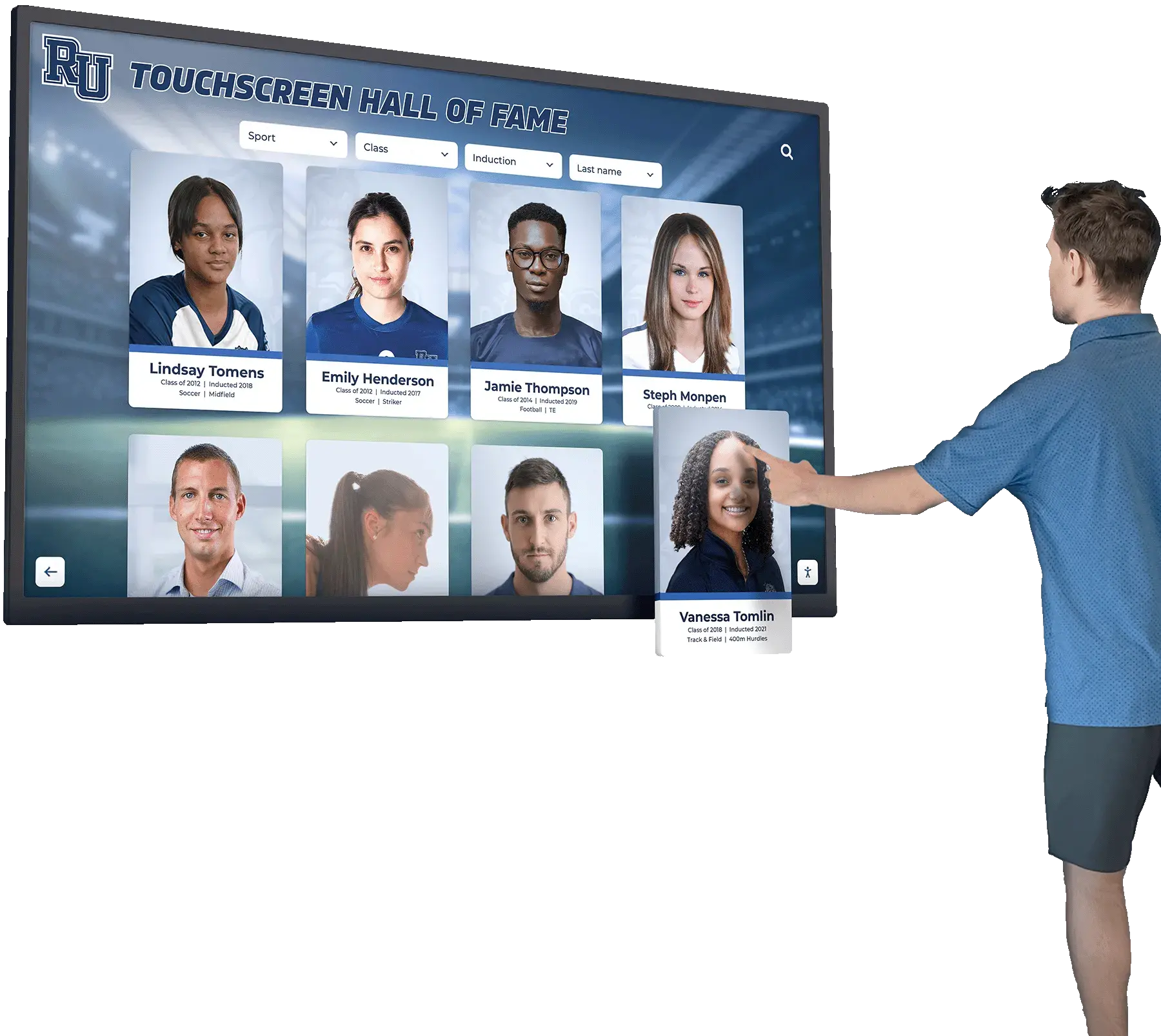
Career stats collected on roster forms give athletic directors the documented history to build comprehensive profile archives on interactive recognition displays
Archive Fields to Future-Proof Your Records
Archive fields are the ones most often skipped—and most often regretted. They exist not for the current season, but for the person who opens the database in 2040 trying to understand what they’re looking at.
Season-Level Archive Fields
| Field | Why It Matters |
|---|---|
| Academic year (e.g., 2025–26) | Distinguishes seasons from a player who redshirted or repeated |
| Sport level (varsity / JV / freshman) | Prevents JV stats from mixing with varsity records |
| Head coach name | Captures coaching era context |
| School mascot and colors at time of season | Schools rebrand; legacy records should reflect what was true then |
| Conference / division | Competitive context for records and awards |
| Overall team record | Season summary for archive pages |
| Playoff finish | Regional, sectional, state finish |
| Uniform number (that season) | Numbers change; archive each year separately |
| Entry date | When this record was entered into the system |
| Last updated | Enables data audits |
Long-Term Archive Fields (Add at Graduation)
These fields complete an athlete’s permanent record:
- College or university attended
- College sport participation (if applicable)
- Career stat summary (final cumulative figures)
- Letters earned (total across all sports)
- Honors at graduation (valedictorian, senior awards, athletic banquet recognition)
- Alumni contact info status (opted in for future outreach: yes/no)
- Hall of fame eligibility year (calculated from graduation year per school policy)
- Digitized artifacts (links to scanned programs, clippings, or photos donated by family)
Programs that capture alumni contact opt-ins at roster time—even as a simple yes/no field—build the foundation for alumni engagement that pays dividends when it comes time to recognize athletes at reunions and milestone events.
Sport-Specific Roster Template Examples
High School Basketball Roster Template
| Field | Example |
|---|---|
| Full name | Jordan Rivera |
| Jersey number | 24 |
| Position | Guard |
| Grade | Junior (11) |
| Height | 6'1" |
| Hometown | Springfield, IL |
| Headshot file | rivera-jordan-2026-basketball.jpg |
| Points per game | 14.3 |
| Assists per game | 4.1 |
| 3-point % | .387 |
| Awards | All-conference first team |
| Season record | 22–7 |
| State finish | Regional finalist |
| Caption quote | “Basketball taught me to compete with composure.” |
High School Track and Field Roster Template
| Field | Example |
|---|---|
| Full name | Amara Okonkwo |
| Events | 100m, 4×100m relay |
| Grade | Senior (12) |
| Hometown | Columbus, OH |
| Season best (100m) | 11.84 |
| School record (100m) | 11.71 (not broken) |
| State qualifier | Yes |
| State finish | 4th place |
| Relay split | 11.9 (leadoff) |
| Career seasons | 4 |
| Letters earned | 3 |
| College commitment | Ohio State (track scholarship) |
| Headshot file | okonkwo-amara-2026-track.jpg |
Youth / Club Roster Template (Simplified)
For club programs or elementary and middle school levels where stat tracking is limited:
| Field | Notes |
|---|---|
| Full name | Required |
| Jersey number | Required |
| Age group / division | Required |
| Hometown | Required |
| Parent/guardian | Required |
| Headshot | Required |
| Season | Required |
| Coach name | Required |
| Participation note | “Started all 14 games,” “Participated in regional tournament,” etc. |
| Award received | Most improved, sportsmanship, team MVP, etc. |
Even for youth programs, the photo-plus-bio-plus-archive approach creates material that feeds meaningful youth sports awards programs and preserves memories families treasure for decades.
Printable Roster Form Checklist
Use this checklist to audit your current template before the season starts:
Photo Fields
- Headshot in uniform (standardized filename)
- Action photo (optional but recommended)
- Team photo with left-to-right roster key
- Photo release on file
Bio Fields
- Full legal name
- Jersey number (current season)
- Grade / graduation year
- Position(s)
- Hometown (city, state)
- Parent/guardian name(s)
- Height / weight (if sport-relevant)
- Years on program / letters earned
- Captain designation
- GPA / academic honors
- College commitment (if applicable)
- Personal quote (optional)
Stat Fields
- Games played / started
- Primary sport-specific stats (3–5 key metrics)
- Season personal best
- Awards and honors
- Records set or approached
Archive Fields
- Academic year
- Sport level (varsity / JV / freshman)
- Head coach name
- Conference and division
- Team record and playoff finish
- Entry date and last-updated date
- Alumni contact opt-in
Digital Roster Templates vs. Paper Forms
Paper roster forms are easy to start but expensive to maintain. Data gets lost when a coach leaves, scanned PDFs are unsearchable, and there is no path from a paper spreadsheet to a digital display.
| Factor | Paper / Spreadsheet | Digital Roster System |
|---|---|---|
| Searchability | Manual | Instant by name, year, sport, stat |
| Photo storage | Separate folder, easily disconnected | Attached to athlete record |
| Update process | Coach edits spreadsheet | Remote update from any device |
| Archive longevity | Dependent on file backup | Cloud-based, institution-level backup |
| Display output | None (manual export required) | Feeds directly to touchscreen displays |
| Year-over-year continuity | Requires manual copy / cleanup | Builds automatically across seasons |
| Alumni access | Not available | Browser and mobile accessible |
Athletic programs that move from paper to digital roster systems—particularly those using platforms designed for recognition displays—find the transition eliminates the recurring data-entry burden while simultaneously building the archive that powers hall of fame recognition, athletic record boards, and interactive lobby displays.
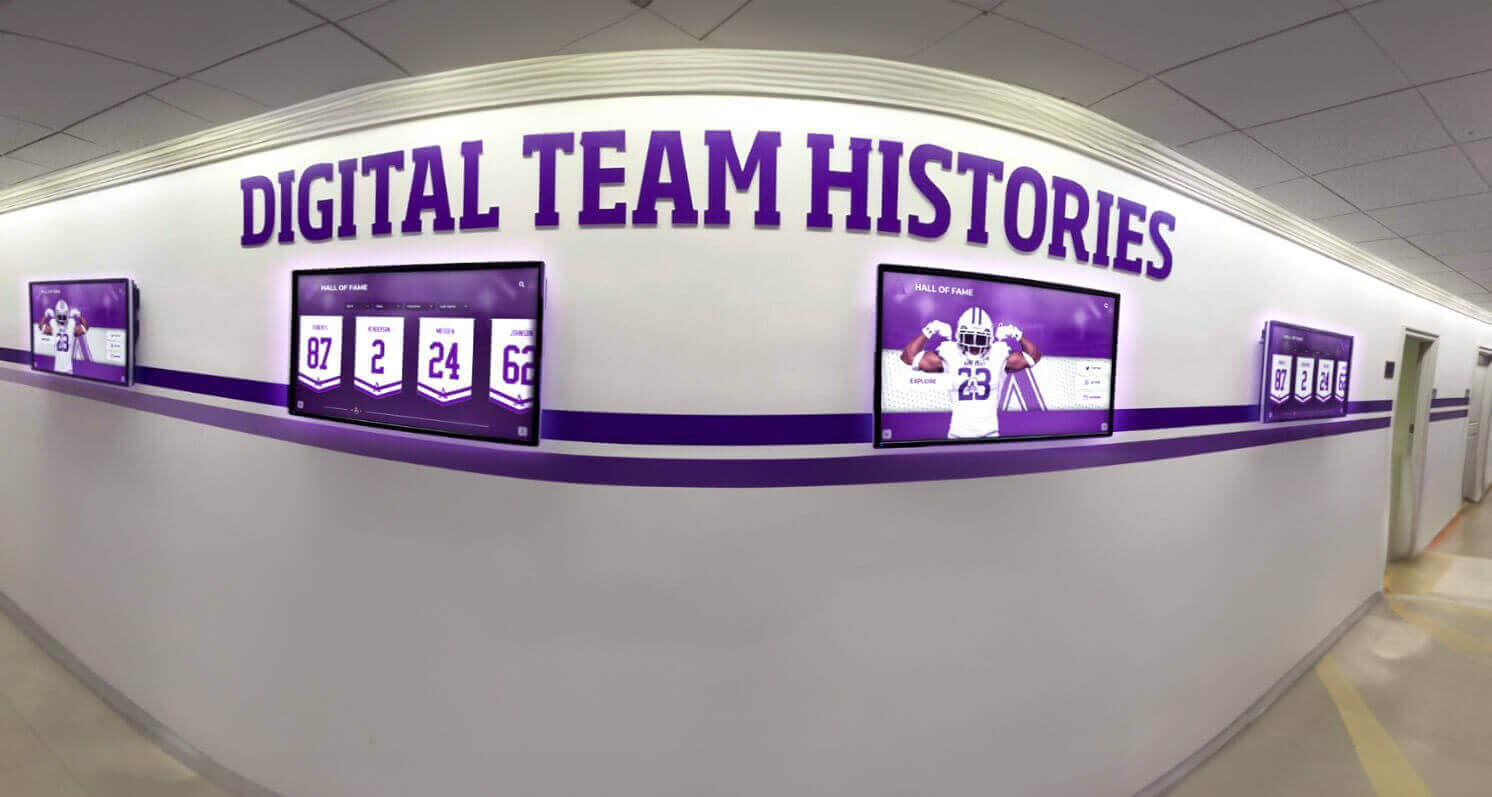
Digital roster systems feed directly into hallway and lobby displays, turning collected fields into visible, browsable athletic history
How Digital Archives Transform Roster Data Into Recognition
Collecting the right fields is step one. Step two is making that data visible and lasting. Schools increasingly use interactive touchscreen displays—in lobbies, fieldhouses, and athletic hallways—to surface the athlete profiles that roster templates build.
A display platform like Touch Archive takes the data collected on a thorough roster form and presents it as:
- Athlete profile cards showing headshot, bio, stats, and career highlights
- Team history pages organized by sport and season with full roster photographs
- Record boards auto-updating when new marks are entered
- Hall of fame galleries drawing on the long-term archive fields added at graduation
- Searchable alumni archives that returning graduates can explore during reunion visits
The connection between roster collection and long-term recognition is direct. Programs that invest in comprehensive fields at the roster stage are the same ones that can inductees into a hall of fame with a complete documented career—not scrambling to reconstruct a biography from partial records. Tools built for exactly this purpose are covered in roundups like the best hall of fame tools for athletics programs and comprehensive hall of fame display guides.
See How Your Roster Data Becomes a Living Archive
Touch Archive helps schools turn athlete photos, bios, and stats into interactive touchscreen displays that preserve program history and recognize every athlete who wore the school's colors. Request a free demo to see what your program's archive could look like.
Request a Free DemoFAQ: Sports Team Roster Templates
What is a sports team roster template? A sports team roster template is a standardized form or digital record for collecting information about each athlete on a team. A complete template includes photo fields (headshot, team photo), bio fields (name, position, hometown, grade), stat fields (season performance, awards), and archive fields (season year, jersey number, coach name) that preserve athlete information for yearbooks, recognition displays, and long-term institutional records.
What fields should a team roster with pictures include? At minimum, a team roster with pictures should include a uniform headshot (standardized file name, minimum 300 dpi), photo release status, athlete name, jersey number, position, grade, and season year. Recommended additions are action photos, a team photo with a row-by-row identification key, and a caption or bio quote for each athlete.
How do you build a printable team roster template? Design a printable roster template as a grid or table with columns for each major field category: photo (attach separately or reference file name), bio (name, number, position, grade, hometown), stats (3–5 sport-specific metrics), and archive (season year, coach, team record). Include a signature or approval line for coaches and a photo release confirmation checkbox for each athlete.
How many years should you keep athlete roster records? Most athletic programs retain roster records permanently as part of institutional athletic history. Minimally, records should be kept through the applicable alumni eligibility window for hall of fame induction (typically 5–10 years post-graduation). For digital archives, permanent retention is practical and recommended—storage cost is negligible compared to the value of a complete historical record.
What makes a roster template useful for digital display platforms? A roster template designed for digital display platforms should include fields that map directly to profile card data: a standardized headshot file, display name, position, graduation year, stat highlights (2–3 key metrics), and an archive year. Systems like Touch Archive can import structured roster data and populate athlete profile displays automatically, eliminating manual re-entry.
How do club and youth programs adapt the template? Youth and club programs should simplify the stat section (participation notes and individual awards replace detailed performance metrics) while keeping photo, bio, and archive fields intact. A headshot, jersey number, age group, hometown, parent names, coach name, and season year creates a meaningful record even for six-year-olds—and families consistently value that documentation far more than programs anticipate.
Should roster templates include GPA or academic information? Yes, for programs that recognize scholar-athletes or submit athletes for academic all-state/all-conference honors. Include a GPA field (or weighted GPA where applicable), academic honor society membership, and notable academic achievements. This data also supports dual-category recognition on school recognition displays that honor both athletic and academic achievement.
Conclusion: Build Once, Archive Forever
The sports team roster template fields covered in this guide—photo, bio, stat, and archive—represent the minimum viable data set for a program that wants to recognize its athletes properly. Collecting them consistently, every season, for every athlete regardless of sport or visibility level, builds an institutional archive that serves recognition purposes for decades.
The work done in the first week of a season to collect a proper headshot, record a hometown, and note a jersey number is the same work that makes a senior night program compelling, a hall of fame profile complete, and an alumni touchscreen display worth exploring. Programs that treat roster data as archive data—not just administrative paperwork—build the kind of athletic legacy that current athletes, returning alumni, and school communities consistently value.
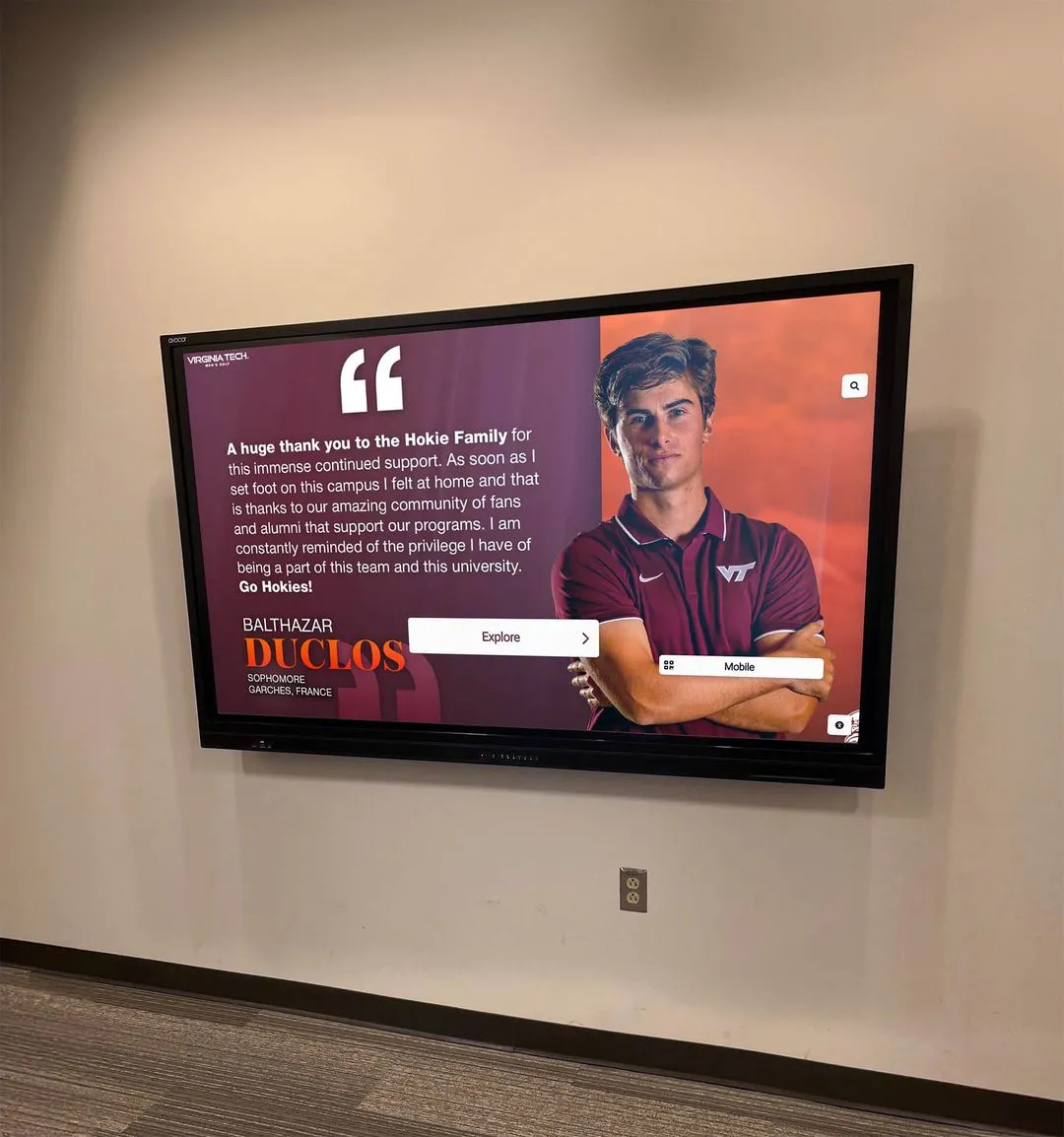
Recognition displays built from complete roster archives give every athlete a permanent presence in program history—long after their last game
For recognition approaches that extend beyond rosters into broader athletic program storytelling, exploring frameworks used for athletic hall of fame tools and touchscreen recognition displays provides useful context for how individual roster records eventually become program-wide legacy content.
Turn Your Roster Template Into a Living Athletic Archive
Discover how Touch Archive helps schools and athletic programs preserve athlete photos, bios, stats, and season histories in interactive touchscreen displays—honoring every athlete who wore the school's colors, in every season, permanently.
Request a Free Demo






























